In this Laravel 12 tutorial titled “laravel 12 with vue.js complete setup guide for beginners”, you will learn how to install vue.js in laravel 12 and setup step by step.
Laravel and Vue.js together form a powerful full-stack combination for building modern, reactive web applications. Laravel 12 provides a robust backend with elegant syntax, while Vue.js offers a flexible and approachable frontend framework for dynamic user interfaces.
This guide walks you through installing Laravel 12 and integrating Vue.js step by step, starting from a clean system to a working Laravel–Vue setup.
Table of Contents
Prerequisites
Ensure the following are installed on your system:
- PHP 8.2 or higher
- Composer
- Node.js (v18+) and npm
- Basic knowledge of Laravel and Vue.js
Check versions:
php -v
composer -V
node -v
npm -v
For Fresh Project
If you want to start with a fresh project, you can use the Laravel 12 starter kit. It is an excellent choice for building SPA applications, as it includes Inertia.js. Inertia.js acts as a bridge between the Laravel backend and the Vue.js frontend, allowing you to build a single-page application without creating a separate API.
Step 1: Ensure Laravel Installer is Installed
Before creating a Laravel application with starter kit, you need to make sure the Laravel Installer is installed globally on your system. The Laravel Installer is a CLI tool that allows you to quickly create new Laravel projects and interactively select a starter kit (such as Laravel + Vue with Inertia) during project creation.
composer global require laravel/installer
Step 2: Install New Laravel Project
Run the command below to create a new Laravel project:
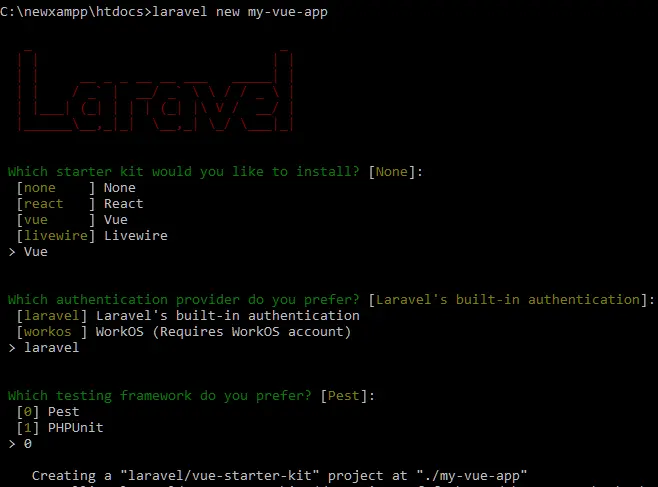
laravel new my-vue-app
During the installation, you will be prompted to select a starter kit. When asked “Which starter kit would you like to install?”, choose Vue, as shown in the preview image below.
Once the installation is complete, navigate to your project directory:
cd my-vue-app
Step 3: Install Frontend Dependencies and Build Assets
Install the frontend dependencies by running the following command:
npm install
Once the installation is complete, build the frontend assets using this command:
npm run dev
Step 4: Test The App
Now, start the Laravel development server by running the following command:
php artisan serve
Make sure the frontend assets are being compiled by keeping the following command running in another terminal:
npm run dev
Open your browser and visit the URL below:
http://127.0.0.1:8000/
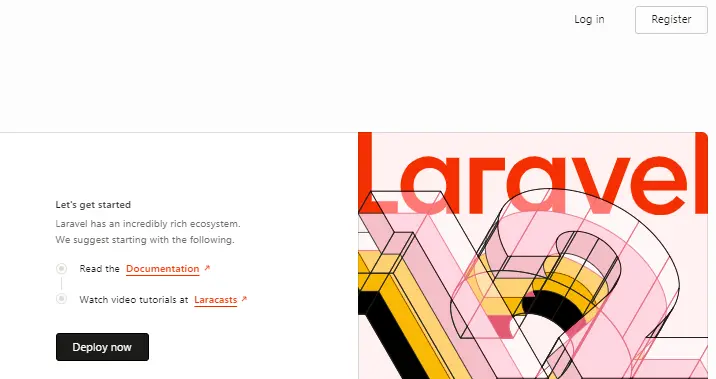
You should see the output as shown in the preview below.
For Existing Projects
If you want to install Vue.js in an existing Laravel 12 project, you can do so using the laravel/ui package. It provides a simple Vue.js setup but does not include Inertia.js, so you will need to configure Inertia manually if required.
Step 1: Install Laravel/UI Package
Run the following command using Composer:
composer require laravel/ui
Read Also :Complete Laravel 12 Custom Login and Registration Tutorial for Beginners
Step 2: Install Vue Scaffolding
Now, run the following command to generate the basic Vue.js scaffolding in your Laravel project:
php artisan ui vue
For authentication scaffolding
If you want to include authentication scaffolding (login, register, password reset views), run the command below instead:
php artisan ui vue --auth
Step 3: Install Frontend Dependencies and Compile Assets
Run the following command to install the frontend dependencies:
npm install
After the installation is complete, compile the frontend assets by running:
npm run dev
Step 4: Now Update Welcome.blade.php to Display Vue Components
Open the resources/views/welcome.blade.php file and update it as shown below. In this file, we modify the <body> section by removing the default Laravel content and adding a <div> with the id=”app”. Inside this div, we include a Vue component named example-component.
<!DOCTYPE html>
<html lang="{{ str_replace('_', '-', app()->getLocale()) }}">
    <head>
        <meta charset="utf-8">
        <meta name="viewport" content="width=device-width, initial-scale=1">

        <title>Laravel</title>

        <!-- Fonts -->
        <link rel="preconnect" href="https://fonts.bunny.net">
        <link href="https://fonts.bunny.net/css?family=instrument-sans:400,500,600" rel="stylesheet" />

        <!-- Styles / Scripts -->
        @if (file_exists(public_path('build/manifest.json')) || file_exists(public_path('hot')))
            @vite(['resources/css/app.css', 'resources/js/app.js'])
        @endif
    </head>
  <body>
    <div id="app">
       <example-component></example-component>
    </div>

  </body>
</html>
The ExampleComponent.vue file is created by default after installing the Vue scaffolding and can be found at: resources/js/components/ExampleComponent.vue
Step 5: Run The Application
Now, start the Laravel development server by running the following command:
php artisan serve
Make sure the frontend assets are being compiled by keeping the following command running in another terminal:
npm run dev
Next, open your browser and visit the URL below: http://127.0.0.1:8000/
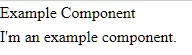
You should see the output similar to the preview shown below.
Conclusion
In this tutorial, “Laravel 12 with Vue.js: Complete Setup Guide for Beginners,” we covered two practical ways to integrate Vue.js into a Laravel 12 application. You learned how to set up Vue.js in a fresh Laravel project using the official starter kit with Inertia.js and how to add Vue.js to an existing Laravel project using the laravel/ui package.
By following this step-by-step guide, you now have a clear understanding of how Laravel 12 and Vue.js work together to build modern, dynamic web applications. Laravel handles the backend logic with its clean and expressive syntax, while Vue.js enhances the frontend with reactive and component-based UI development.
If your goal is to build a single-page application (SPA), the Laravel starter kit with Inertia.js and Vue is the recommended and future-ready approach. For simpler projects or legacy applications, using laravel/ui provides a quick and straightforward Vue setup.
From here, you can continue by creating custom Vue components, integrating APIs, adding authentication, or exploring advanced features like state management and routing. With Laravel 12 and Vue.js combined, you now have a powerful foundation to build scalable and high-performance web applications.
