In this Laravel 12 tutorial titled “Laravel 12 with Vue.js 3 Authentication Complete guide Step by Step”, you will learn how to build a modern Single Page Application (SPA) authentication system using Laravel and Vue.js.
This guide demonstrates how to integrate Laravel Sanctum for secure authentication while using Vue.js 3 to build a dynamic frontend interface.
Table of Contents
Technologies Used
- Laravel 12 as the backend framework for building RESTful APIs
- Laravel Sanctum for secure session-based authentication
- Vue.js 3 as the frontend framework for the SPA
- Axios for handling HTTP requests between the frontend and backend
- Bootstrap for responsive and clean user interface components
- Session-based authentication, providing a simple and secure authentication mechanism for SPA applications
Features Implemented
Throughout this tutorial, you will build the following features:
- User Registration
- User Login
- Authentication using Laravel Sanctum
- Retrieve the authenticated user profile
- Logout functionality
- By the end of this tutorial, you will have a fully functional Laravel 12 + Vue.js 3 authentication system with Sanctum and a practical foundation for building secure SPA applications.
Why Choose Laravel Sanctum?
Laravel Sanctum is a lightweight authentication system designed to make API and SPA authentication simple and secure. It supports two primary authentication approaches:
- SPA Authentication (Session & Cookies) – Ideal for Single Page Applications such as Vue.js or React. This is the approach we will implement in this tutorial.
- API Token Authentication – Commonly used for mobile applications or external services that interact with your API.
Why SPA Authentication Works Well with Vue
For Vue-based Single Page Applications, Sanctum’s session-based authentication offers several practical advantages:
- No need to manually manage tokens on the frontend.
- Secure cookie-based authentication, which helps protect against common security risks.
- Quick and straightforward setup compared to more complex authentication systems.
- Recommended by the Laravel team for SPA applications.
Simply put: Laravel Sanctum keeps authentication clean, secure, and easy to maintain—allowing developers to focus more on building application features rather than dealing with complicated authentication logic.
Prerequisites
Before starting this tutorial, make sure the following tools and setup are already installed on your system:
- PHP (8.2 or higher)
- Composer
- Node.js and NPM
- Laravel 12 project already installed
- Vue.js 3 installed in the project
If you have not completed the basic setup yet, you may find the following tutorials helpful:
- Laravel 12 CRUD With Vue JS 3 Tutorial Step-by-Step Guide
- Laravel 12 with Vue.js Complete Setup Guide for Beginners
Step 1: Install Laravel Sanctum
In Laravel 12, installing Sanctum is very simple using the built-in Artisan command:
php artisan install:api
This command automatically performs several tasks for you:
- Installs the Laravel Sanctum package
- Creates the api.php routes file
- Publishes the Sanctum configuration
- Generates the personal_access_tokens migration table
After running the command, execute the migrations to create the required database tables:
php artisan migrate
Once the migration is completed, Sanctum will be properly installed and ready to use for API authentication.
Read Also : Laravel 12 Reset Password Using OTP Sanctum API Example
Step 2: Configure Laravel Sanctum (Important)
After installing Sanctum, the next step is configuring it correctly so your Vue.js SPA can authenticate using cookies and sessions.
Open the Sanctum configuration file: config/sanctum.php
Make sure the stateful domains include your application domain:
'stateful' => explode(',', env('SANCTUM_STATEFUL_DOMAINS', 'localhost,127.0.0.1')),
This tells Sanctum which frontend domains are allowed to use session-based authentication.
Update .env Configuration
Update Environment Configuration
SANCTUM_STATEFUL_DOMAINS=127.0.0.1:8000
SESSION_DRIVER=cookie
SESSION_DOMAIN=127.0.0.1
Important: If Sanctum is not configured correctly, login may appear successful but every authenticated request will return a 401 Unauthorized response.
For production environments, it is recommended to define SANCTUM_STATEFUL_DOMAINS as a comma-separated list of your allowed domains.
Example:
SANCTUM_STATEFUL_DOMAINS=yourdomain.com,www.yourdomain.com
Step 3: Enable Sanctum Middleware (Laravel 12)
Finally, ensure Sanctum middleware is enabled so your SPA can authenticate using cookies.
Open bootstrap/app.php, Add the following middleware if it is not already present:
use Laravel\Sanctum\Http\Middleware\EnsureFrontendRequestsAreStateful;
  $middleware->append([
            EnsureFrontendRequestsAreStateful::class,
        ]);
It Look Like this
<?php

use Illuminate\Foundation\Application;
use Illuminate\Foundation\Configuration\Exceptions;
use Illuminate\Foundation\Configuration\Middleware;
use Laravel\Sanctum\Http\Middleware\EnsureFrontendRequestsAreStateful;

return Application::configure(basePath: dirname(__DIR__))
    ->withRouting(
        web: __DIR__.'/../routes/web.php',
        api: __DIR__.'/../routes/api.php',
        commands: __DIR__.'/../routes/console.php',
        health: '/up',
    )
    ->withMiddleware(function (Middleware $middleware): void {
        $middleware->append([
            EnsureFrontendRequestsAreStateful::class,
        ]);
    })
    ->withExceptions(function (Exceptions $exceptions): void {
        //
    })->create();
This middleware ensures that requests coming from your frontend application are treated as stateful, allowing Vue.js to authenticate using Laravel sessions and cookies.
Step 4: Create Authentication Controller
Run the command:
php artisan make:controller AuthController
Now open the controller:
<?php

namespace App\Http\Controllers;

use Illuminate\Database\QueryException;
use App\Http\Controllers\Controller;
use Illuminate\Support\Facades\Auth;
use Illuminate\Http\Request;
use App\Models\User;

class AuthController extends Controller
{
    /**
     * Register api
     *
     * @return \Illuminate\Http\Response
     */
    public function register(Request $request)
    {
        $request->validate([
            'name' => 'required',
            'email' => 'required|email',
            'password' => 'required|string|min:8',
            'password_confirmation' => 'required|same:password',
        ]);

        try{

        $data = $request->all();
        $data['password'] = bcrypt($data['password']);
        $user = User::create($data);

        Auth::login($user);

        return response()->json([
        'user' => $user
        ], 200);


        } catch (QueryException  $e) {
              return response()->json([
                'status' => false,
                'message' => $e->getMessage(),
            ],500);
        }
    }

    /**
     * Login api
     *
     * @return \Illuminate\Http\Response
     */
    public function login(Request $request)
    {
        $request->validate([
            'email' => 'required|email',
            'password' => 'required|string',
        ]);

        if(Auth::attempt(['email' => $request->email, 'password' => $request->password])){
            $user = Auth::user();

            return response()->json([
                'user' => $user
            ], 200);

        }
        else{
             return response()->json(['message'=>'Invalid credentials.'],401);
        }
    }


      /**
     * User Profile API
     */
    public function profile(Request $request)
    {
         return response()->json([
                'message' => 'User data fetched successfully.',
                'data' => $request->user()
            ], 200);


    }

    /**
     * Logout API
     */
    public function logout(Request $request)
    {
         Auth::guard('web')->logout();

         return response()->json([
                'message' => 'User logged out successfully.',
            ], 200);

    }
}
Step 5: Create API Routes
Open routes/api.php
<?php

use Illuminate\Http\Request;
use Illuminate\Support\Facades\Route;
use App\Http\Controllers\AuthController;

// Public routes
Route::post('register', [AuthController::class, 'register']);
Route::post('login', [AuthController::class, 'login']);

// Protected routes
Route::middleware('auth:sanctum')->group(function () {
    Route::get('profile', [AuthController::class, 'profile']);
    Route::post('logout', [AuthController::class, 'logout']);
});
In this Write protected routes inside auth:sanctum
Step 6: Configure Vue for Authentication
To allow Vue.js to communicate properly with the Laravel backend, Axios must be configured correctly. This ensures that authentication cookies and requests work with Laravel Sanctum.
Open the following file: resources/js/bootstrap.js, Then import Axios and configure it as shown below:
import 'bootstrap';

import axios from 'axios';
window.axios = axios;

axios.defaults.withCredentials = true;
axios.defaults.baseURL = 'http://127.0.0.1:8000';
Explanation:
- baseURL defines the Laravel backend URL that Axios will use for API requests.
- withCredentials allows the browser to send authentication cookies with each request, which is required for Sanctum’s session-based authentication.
Request the CSRF Cookie
Before sending any login or registration request, the application must first obtain a CSRF cookie from Laravel.
await axios.get('/sanctum/csrf-cookie');
This step is required because Laravel Sanctum uses CSRF protection to secure authentication requests. Without retrieving this cookie, login or registration requests will fail.
In short, always request the CSRF cookie first, then send your authentication request.
Step 7: Create Vue Components
Create the component resources/js/components/auth/Auth.vue
<template>

<div class="row justify-content-center mt-3">
<div class="col-md-6"  v-if="is_auth">


    <ul class="nav nav-tabs nav-justified mb-3"  >

        <li class="nav-item">
            <button
                class="nav-link"
                :class="{active: activeTab==='registerForm'}"
                @click="activeTab='registerForm'"
            >
                Register
            </button>
        </li>

        <li class="nav-item">
            <button
                class="nav-link btn-info"
                :class="{active: activeTab==='loginForm'}"
                @click="activeTab='loginForm'"
            >
                Login
            </button>
        </li>

    </ul>


    <div class="card p-4 shadow-sm" >
       <p v-if="auth_error" class="text-danger">
                 {{ auth_error }}
            </p>
        <!-- REGISTER -->
        <template v-if="activeTab==='registerForm'">

            <h4 class="mb-3">Register</h4>

             <p v-if="register_errors?.message" class="text-danger">
            {{ register_errors.message }}
            </p>


            <div class="mb-3">
                <label class="form-label">Name</label>
                 <input type="text" name="name" class="form-control" v-model="register.name" :class=" register_errors?.name ? 'is-invalid': '' "/>
                <span v-if="register_errors?.name" class="invalid-feedback">{{ register_errors.name[0] }}  </span>
            </div>

            <div class="mb-3">
                <label class="form-label">Email</label>
                <input type="text" class="form-control" name="email" v-model="register.email" :class=" register_errors?.email ? 'is-invalid': ''"/>

               <span v-if="register_errors?.email" class="invalid-feedback">{{ register_errors.email[0] }}  </span>
            </div>

            <div class="mb-3">
                <label class="form-label">Password</label>
                <input type="password" name="password" class="form-control" v-model="register.password" :class=" register_errors?.password ? 'is-invalid': ''" />
               <span v-if="register_errors?.password" class="invalid-feedback">{{ register_errors.password[0] }}  </span>
            </div>
             <div class="mb-3">
                <label class="form-label">Confirm Password</label>
                <input type="password"  name="password_confirmation" class="form-control" v-model="register.password_confirmation"  :class="register_errors?.password_confirmation ? 'is-invalid' : ''"    />

                <span v-if="register_errors?.password_confirmation" class="invalid-feedback">{{ register_errors.password_confirmation[0] }}  </span>

            </div>

            <button class="btn btn-primary w-100" @click="registerUser" :disabled="is_register">
                Register Now!
                 <span v-if="is_register">
                <i class="fa fa-spinner fa-spin"></i>
                </span>
            </button>

        </template>


        <!-- LOGIN -->
        <template v-if="activeTab==='loginForm'" >

            <h4 class="mb-3">Login</h4>


            <div class="mb-3">
                <label class="form-label">Email</label>
                <input type="text" class="form-control" name="email" v-model="login.email" :class=" login_errors?.email ? 'is-invalid': ''"/>
               <span v-if="login_errors?.email" class="invalid-feedback">{{ login_errors.email[0] }}  </span>
            </div>

            <div class="mb-3">
                <label class="form-label">Password</label>
                <input type="password" name="password" class="form-control" v-model="login.password" :class=" login_errors?.password ? 'is-invalid': ''" />
               <span v-if="login_errors?.password" class="invalid-feedback">{{ login_errors.password[0] }}  </span>
            </div>

            <button class="btn btn-success w-100" @click="loginUser" :disabled="is_login">
                Login
                <span v-if="is_login">
                <i class="fa fa-spinner fa-spin"></i>
                </span>
            </button>

        </template>

    </div>
    </div>
    <div class="col-md-6"  v-if="!is_auth">

            <a class="btn btn-sm btn-info" href="javascript:void(0)" @click="logout">Logout</a>

    <h1> Welcome {{profile.name}}!</h1>

</div>
</div>

</template>


<script setup>
import { ref,onMounted  } from 'vue'


const activeTab = ref('registerForm')
const register = ref({name:"",email:"",password:"",password_confirmation:""})
const login = ref({email:"",password:""})
const register_errors = ref({})
const login_errors = ref({})
const is_register = ref(false)
const is_login = ref(false)
const is_auth  = ref(true)
const profile  = ref({})
const auth_error  = ref("")


//Methods
 const registerUser = async () => {

         is_register.value = true
         await axios.get('/sanctum/csrf-cookie');
         await axios.post(`/api/register`, register.value).then(({data})=>{
                getUser()

            }).catch((error)=>{
                if (error.response?.status === 422) {
                     auth_error.value = ""
                    Object.keys(register_errors).forEach(key => delete register_errors[key])
                    Object.assign(register_errors, error.response.data.errors)
                } else {
                     Object.keys(register_errors).forEach(key => delete register_errors[key])
                    auth_error.value = error.response?.data?.message
                }
            }).finally(()=>{
                 is_register.value = false  // STOP LOADING
                 //reset(register,register_errors)
            })


 }

 const loginUser = async() =>{

         is_login.value = true
         await axios.get('/sanctum/csrf-cookie');
         await axios.post(`/api/login`, login.value).then(({data})=>{
                getUser()


            }).catch((error)=>{
                if (error.response?.status === 422) {
                    auth_error.value  = ""
                    Object.keys(login_errors).forEach(key => delete login_errors[key])
                    Object.assign(login_errors, error.response.data.errors)
                } else {
                     Object.keys(login_errors).forEach(key => delete login_errors[key])
                    auth_error.value = error.response?.data?.message
                }

            }).finally(()=>{
                 is_login.value = false  // STOP LOADING
                 //reset(login,login_errors)
            })


 }

const getUser = async () => {

    await axios.get(`/api/profile`).then(({data})=>{
        // user logged in
        is_auth.value = false
        profile.value = data.data
        localStorage.setItem("User", JSON.stringify(data.data));


    })

}

const logout = async () => {
    await axios.post('api/logout/').then(({data})=>{

        is_auth.value = true
        profile.value = {}
        localStorage.removeItem("User");
        reset()
    }).catch((error)=>{
        console.log(error.response)
    })
}

const reset = () =>{
  auth_error.value = ""
  Object.keys(login_errors).forEach(key => delete login_errors[key])
  Object.keys(register_errors).forEach(key => delete register_errors[key])
   login.value = {
    email: "",
    password: ""
    }

    register.value = {
    name: "",
    email: "",
    password: "",
    password_confirmation: ""
    }

}

const checklogin =() =>{
   let user = localStorage.getItem("User");

   if(user){
    profile.value = JSON.parse(user)
    is_auth.value = false
   }
}

onMounted(() => {
  checklogin()
})
</script>
Vue Authentication UI Explanation
Template Section
- Uses Bootstrap layout to center the authentication card.
- v-if=”is_auth” : shows Register/Login forms if user is not authenticated.
- v-if=”!is_auth” : shows welcome message and logout button after login.
Tabs Navigation
- Two tabs: Register and Login.
- activeTab controls which form is displayed.
- Clicking tab buttons switches between forms.
Register Form
- Inputs for Name, Email, Password, Confirm Password.
- Uses v-model to bind input data.
- Displays validation errors from API.
- Register button calls registerUser() method.
- Shows loading spinner when request is processing.
Login Form
- Inputs for Email and Password.
- Uses v-model for data binding.
- Shows validation errors if login fails.
- Login button calls loginUser() method.
Logged-in View
- Shows Welcome message with user name.
- Provides Logout button.
Vue Authentication Methods
registerUser()
- Requests Sanctum CSRF cookie.
- Sends registration request to /api/register.
- If successful calls getUser().
- Handles validation errors.
loginUser()
- Gets CSRF cookie.
- Sends login request to /api/login.
- If successful fetches user profile.
getUser()
- Calls /api/profile.
- Stores user data.
- Updates UI to logged-in state.
- Saves user in localStorage.
logout()
- Sends request to /api/logout.
- Clears user data.
- Removes user from localStorage.
- Resets form state.
reset()
- Clears form fields.
- Removes validation errors.
checklogin()
- Checks if user exists in localStorage.
- If found automatically logs user in.
onMounted()
- Runs checklogin() when component loads.
Step 7: Update app.js
Open resources/js/app.js and import the components
import './bootstrap';
import { createApp } from 'vue';


const app = createApp({});


import Auth from './components/auth/Auth.vue';

app.component('Auth', Auth);

app.mount('#app');
Step 8: Update Welcome Blade
<!DOCTYPE html>
<html>
<head>
    <title>Laravel 12 with Vue.js 3 Authentication Complete Guide Step By Step</title>
     @vite(['resources/css/app.css', 'resources/js/app.js'])
    <link href="https://cdn.jsdelivr.net/npm/bootstrap@5.3.8/dist/css/bootstrap.min.css" rel="stylesheet">
    <link rel="stylesheet" href="https://cdnjs.cloudflare.com/ajax/libs/font-awesome/6.5.1/css/all.min.css" />
</head>
<body>
    <div class="container mt-5">
        <div class="card">
            <h5 class="card-header bg-primary text-white">Laravel 12 with Vue.js 3 Authentication Complete Guide Step By Step - ItStuffSolutiotions</h5>

            <div id="app">

                <Auth />
            </div>
        </div>
    </div>

    <script src="https://cdn.jsdelivr.net/npm/bootstrap@5.3.8/dist/js/bootstrap.bundle.min.js"></script>


</body>

</html>
Explanation
- CDN links (Bootstrap and Font Awesome) are used to quickly add styling and icons without installing them locally.
- The id=”app” div is the mounting point for Vue.js, where Vue renders components.
- The <Auth /> is a Vue component that gets displayed inside the app div.
- @vite loads the compiled Laravel + Vue CSS and JavaScript files.
Step 9: Run The Application
We have successfully completed all the steps. Now it’s time to run the Laravel application and test the authentication system.
First, start the Laravel development server by running the following command:
php artisan serve
This will start the Laravel server at: http://127.0.0.1:8000
Next, start the Vite development server for compiling Vue.js assets.
Run the following command:
npm run dev
After both servers are running, open your browser and visit: http://127.0.0.1:8000
You can now test the Login/Register, Profile, Logout implemented in this tutorial. After login, the application automatically calls the /api/profile endpoint to fetch the logged-in user information.
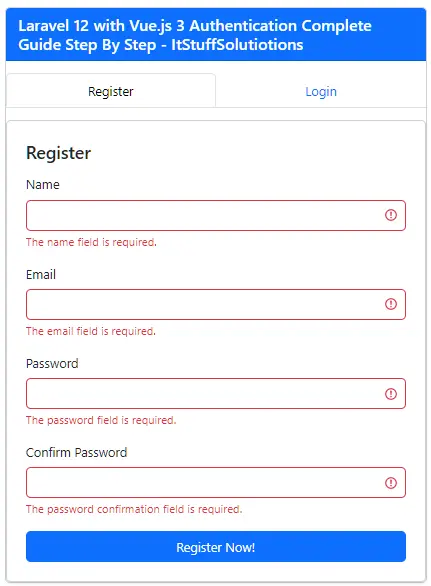
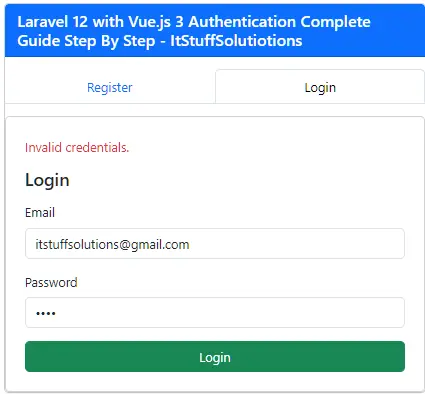
Click the Logout button to destroy the session and return to the login/register screen.
If everything is configured correctly, you now have a fully functional Laravel 12 + Vue.js 3 authentication system using Laravel Sanctum.
Common Mistakes
When implementing Laravel Sanctum authentication with Vue.js, developers often face some common issues. Below are the most frequent mistakes and their solutions.
401 Unauthorized Error After Login
If login seems successful but protected routes return 401 Unauthorized, it usually means Sanctum is not properly configured.
Make sure your .env file configure correctly.
Also confirm that the Sanctum middleware is enabled in bootstrap/app.php.
Not Requesting the CSRF Cookie
Sanctum requires a CSRF cookie before sending login or register requests.
Always call this before authentication requests:
await axios.get('/sanctum/csrf-cookie');
If this step is skipped, authentication requests will fail.
Axios Not Sending Cookies
If authentication does not persist, check your Axios configuration.
Make sure this line exists in bootstrap.js:
axios.defaults.withCredentials = true;
This allows cookies to be sent with requests.
Protected Routes Missing Middleware
Your protected API routes must use the auth:sanctum middleware.
Without this middleware, authentication will not work correctly.
Wrong API Base URL
If requests fail, verify the Axios base URL.
Make sure it matches the Laravel server URL.
Conclusion
In this tutorial, we built a complete authentication system using Laravel 12, Vue.js 3, and Laravel Sanctum.
We covered the entire process step-by-step, including:
- Installing Laravel Sanctum
- Configuring Sanctum for SPA authentication
- Creating authentication APIs
- Protecting routes with Sanctum middleware
- Configuring Axios for cookie-based authentication
- Building Vue.js components for login and registration
- Fetching authenticated user profile
- Implementing logout functionality
Laravel Sanctum provides a clean and secure authentication system for Single Page Applications, making it an excellent choice for projects built with Vue.js or React.
FAQs
Why use Sanctum instead of JWT?
Sanctum is simpler to implement for SPA applications because it uses Laravel sessions and cookies instead of manually managing tokens.
Do I need Laravel Breeze or Jetstream for this setup?
No. In this tutorial, we built a custom authentication system using Sanctum and Vue.js without Breeze or Jetstream.
