In this Laravel tutorial titled “Laravel 12 Inertia.js+Vuejs3 CRUD Tutorial Step-by-Step Guide”, you will learn How to use inertia to create CRUD with authentication. Modern web development is evolving fast, and the combination of Laravel 12, Inertia.js, and Vue.js 3 offers one of the cleanest and most powerful ways to build full-stack applications—without the complexity of traditional APIs.
In this tutorial, you’ll learn how to build a complete CRUD (Create, Read, Update, Delete) application using this modern stack.
Table of Contents
Why Use Laravel + Inertia + Vue?
Instead of building separate backend and frontend apps, Inertia acts as a bridge:
- No REST or GraphQL API required
- Use Vue components directly with Laravel routes
- Faster development with SPA experience
- Clean and maintainable codebase
If you want to use inertia in old project read this tutorial : Laravel 12 with Vue.js Complete Setup Guide for Beginners
Step 1: Install Laravel 12
Run the command below to create a new Laravel project:
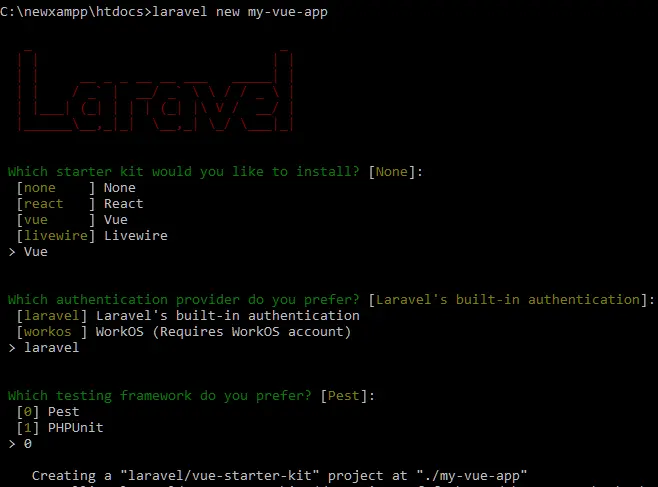
laravel new my-vue-app
During the installation, you will be prompted to select a starter kit. When asked “Which starter kit would you like to install?”, choose Vue, as shown in the preview image below.
Once the installation is complete, navigate to your project directory:
cd my-vue-app
Step 3: Install Frontend Dependencies and Build Assets
Install the frontend dependencies by running the following command:
npm install
Once the installation is complete, build the frontend assets using this command:
npm run dev
Step 4: Create Model, Migration and Controller
Run the following command to create the Model, Migration, and Controller for Product CRUD:
php artisan make:model Product -mcr
Update Migration File
Open the generated migration in database/migrations/xxxx_xx_xx_xxxxxx_create_products_table.php :
<?php

use Illuminate\Database\Migrations\Migration;
use Illuminate\Database\Schema\Blueprint;
use Illuminate\Support\Facades\Schema;

return new class extends Migration
{
    /**
     * Run the migrations.
     */
    public function up(): void
    {
        Schema::create('products', function (Blueprint $table) {
            $table->id();
            $table->string('name');
            $table->text('description');
            $table->decimal('price',8,2);
            $table->timestamps();
        });
    }

    /**
     * Reverse the migrations.
     */
    public function down(): void
    {
        Schema::dropIfExists('products');
    }
};
Run migration:
php artisan migrate
Update Product Model
Open app/Models/Product.php and add fillable:
<?php

namespace App\Models;

use Illuminate\Database\Eloquent\Model;
use Illuminate\Database\Eloquent\Factories\HasFactory;

class Product extends Model
{
    use HasFactory;

    protected $fillable = [
        'name', 'description','price'
    ];
}
Step 5: Update ProductController For CRUD
Now open: app/Http/Controllers/ProductController.php and add the following code:
<?php

namespace App\Http\Controllers;

use App\Models\Product;
use Inertia\Inertia;
use Illuminate\Http\Request;

class ProductController extends Controller
{
    /**
     * Display a listing of the resource.
     */
    public function index()
    {
        $products = Product::all();
        return Inertia::render('products/Index', ['products' => $products]);
    }

    /**
     * Show the form for creating a new resource.
     */
    public function create()
    {
        return Inertia::render('products/Create');

    }

    /**
     * Store a newly created resource in storage.
     */
    public function store(Request $request)
    {
        $request->validate([
            'name' => 'required|min:3',
            'price' => 'required|numeric|min:1',
            'description' => 'required|string',
        ]);

        $product = new Product($request->all());
        $product->save();

        return redirect()->route('products.index');
    }


    /**
     * Show the form for editing the specified resource.
     */
    public function edit(Product $product)
    {
        return Inertia::render('products/Edit', ['product' => $product]);
    }

    /**
     * Update the specified resource in storage.
     */
    public function update(Request $request, Product $product)
    {
        $request->validate([
            'name' => 'required|min:3',
            'price' => 'required|numeric|min:1',
            'description' => 'required|string',
        ]);

        $product->update($request->all());
        return redirect()->route('products.index');
    }

    /**
     * Remove the specified resource from storage.
     */
    public function destroy(Product $product)
    {
         $product->delete();
        return redirect()->back();
    }
}
Explanation
index()
- Gets all products from DB
- Inertia::render() loads products/Index.vue
- Sends data as props → products
create()
- No DB work
- Loads products/Create.vue via Inertia
- Used to show form
store()
- Validates form data
- Saves new product
- Redirect → Inertia reloads page (SPA style)
- Errors auto sent to Vue
edit()
- Gets product (auto via route binding)
- Loads products/Edit.vue
- Sends product as prop
update()
- Validates data
- Updates product in DB
- Redirect → Inertia refreshes UI
destroy()
- Deletes product
- Redirect back
- Inertia updates page without reload
Read also : Laravel 12 CRUD With Vue JS 3 Tutorial Step-by-Step Guide
Step 6: Create Vue Component
Create file: resources/js/pages/products/Index.vue
<script setup lang="ts">
import AppLayout from '@/layouts/AppLayout.vue';
import { type BreadcrumbItem } from '@/types';
import { Head, Link, useForm } from '@inertiajs/vue3';
import { Button } from '@/components/ui/button';
import { Spinner } from '@/components/ui/spinner';
import { ref } from 'vue';

const breadcrumbs: BreadcrumbItem[] = [
    {
        title: 'Products',
        href: route('products.index'),
    },
];

defineProps({
  products: Array,
});

const form = useForm({});
const deletingId = ref(null);

const deleteProduct = (id: number) => {
    if (confirm("Are you sure you want to delete this product?")) {
        deletingId.value = id;
        form.delete(`/products/${id}`, {
            onFinish: () => {
                deletingId.value = null;
            },
        });
    }
};
</script>

<template>
    <Head title="Products" />

    <AppLayout :breadcrumbs="breadcrumbs">
        <div class="py-12">
            <div class="max-w-7xl mx-auto sm:px-6 lg:px-8">
                <div class="bg-white overflow-hidden shadow-sm sm:rounded-lg">
                    <div class="p-6 text-gray-900">

                        <!-- Create Button -->
                        <Link href="/products/create">
                             <Button  variant="info" class="mb-4">
                                Create Product
                            </Button>
                        </Link>

                        <!-- Table -->
                        <table class="table-auto w-full border">
                            <thead>
                                <tr>
                                    <th class="border px-4 py-2">ID</th>
                                    <th class="border px-4 py-2">Name</th>
                                    <th class="border px-4 py-2">Description</th>
                                    <th class="border px-4 py-2">Price</th>
                                    <th class="border px-4 py-2 w-[250px]">Action</th>
                                </tr>
                            </thead>

                            <tbody>
                                <tr v-if="products.length" v-for="product in products" :key="product.id">
                                    <td class="border px-4 py-2">{{ product.id }}</td>
                                    <td class="border px-4 py-2">{{ product.name }}</td>
                                    <td class="border px-4 py-2">{{ product.description }}</td>
                                    <td class="border px-4 py-2">{{ product.price }}</td>

                                    <td class="border px-4 py-2 flex gap-2">

                                        <!-- Edit -->
                                        <Link :href="`/products/${product.id}/edit`">
                                            <Button size="sm" variant="info">
                                                Edit
                                            </Button>
                                        </Link>

                                        <!-- Delete -->
                                        <Button
                                            variant="destructive"
                                            size="sm"
                                            :disabled="deletingId === product.id"
                                            @click="deleteProduct(product.id)"
                                            class="flex items-center gap-1"
                                        >
                                            <Spinner v-if="deletingId === product.id" />
                                            <span>Delete</span>
                                        </Button>

                                    </td>
                                </tr>

                                <!-- Empty state -->
                                <tr v-else>
                                    <td colspan="5" class="text-center py-4 font-semibold text-gray-500">
                                        No Products Found!!
                                    </td>
                                </tr>
                            </tbody>
                        </table>

                    </div>
                </div>
            </div>
        </div>
    </AppLayout>
</template>
Explanation
Script Section (<script setup>)
- lang=”ts” : using TypeScript (typed JavaScript).
- import … : bringing in components & tools (layout, buttons, Vue functions).
- breadcrumbs : list for page navigation (like “Products > …”).
- defineProps({ products: Array }) : receives products data from backend.
- useForm() : used to send requests (like delete).
- ref(null) : creates reactive variable (deletingId).
Delete Function
- deleteProduct(id) : runs when delete button is clicked.
- confirm() : asks user before deleting.
- deletingId.value = id : shows loading for that item.
- form.delete(…) : sends DELETE request to server.
- onFinish : resets loading after delete completes.
Template Section (<template>)
- <Head title=”Products” /> : sets page title.
- <AppLayout> : wraps page in layout.
- “Create Product” button : goes to create page.
Table Display
- v-for=”product in products” : loops through products.
- :key=”product.id” : unique key for each row.
- {{ }} : displays product data (id, name, etc).
Actions (Edit & Delete)
- Edit : goes to edit page (/products/{id}/edit).
- Delete : calls deleteProduct(id).
Loading State
- :disabled=”deletingId === product.id”: disables button while deleting.
- <Spinner v-if=”…”>: shows loading icon.
Empty State
- v-if=”products.length” : shows table if data exists.
- v-else : shows “No Products Found!!” if empty.
Create file: resources/js/pages/products/Create.vue
<script setup lang="ts">
import AppLayout from '@/layouts/AppLayout.vue';
import { type BreadcrumbItem } from '@/types';
import { Head, Form } from '@inertiajs/vue3';
import InputError from '@/components/InputError.vue';
import { Spinner } from '@/components/ui/spinner';
import { Button } from '@/components/ui/button';

const breadcrumbs: BreadcrumbItem[] = [
    {
        title: 'Products',
        href: route('products.index'),
    },
    {
        title: 'Create Product',
        href: route('products.create'),
    },
];
</script>

<template>
    <Head title="Products" />

    <AppLayout :breadcrumbs="breadcrumbs">
        <div class="py-12">
            <div class="max-w-7xl mx-auto sm:px-6 lg:px-8">
                <div class="bg-white overflow-hidden shadow-sm sm:rounded-lg">
                    <div class="p-6 text-gray-900">

                        <!--  Inertia Form -->
                        <Form
                            action="/products"
                            method="post"
                            v-slot="{ errors, processing }"
                        >
                            <div class="mb-4">
                                <label class="block text-gray-700 text-sm font-bold mb-2">
                                    Name:
                                </label>
                                <input
                                    type="text"
                                    name="name"
                                    class="shadow border rounded w-full py-2 px-3"
                                    placeholder="Enter Name"
                                />
                                <InputError :message="errors.name" />
                            </div>

                            <div class="mb-4">
                                <label class="block text-gray-700 text-sm font-bold mb-2">
                                    Price:
                                </label>
                                <input
                                    type="text"
                                    name="price"
                                    class="shadow border rounded w-full py-2 px-3"
                                    placeholder="Enter Price"
                                />
                                <InputError :message="errors.price" />
                            </div>

                            <div class="mb-4">
                                <label class="block text-gray-700 text-sm font-bold mb-2">
                                    Description:
                                </label>
                                <textarea
                                    name="description"
                                    class="shadow border rounded w-full py-2 px-3"
                                    placeholder="Enter Description"
                                ></textarea>
                                <InputError :message="errors.description" />
                            </div>

                            <Button variant="info"
                                type="submit"
                                class=" flex items-center gap-2"
                                :disabled="processing"
                            >
                                <Spinner v-if="processing" />
                                <span v-if="!processing">Submit</span>
                                <span v-else>Submitting...</span>
                            </Button>
                        </Form>

                    </div>
                </div>
            </div>
        </div>
    </AppLayout>
</template>
Explanation
Form (Main Part)
- Name : text input
- Price : text input
- Description : textarea
- name=”…” : important for sending data
Error Handling
- <InputError :message=”errors.field” />
- InputError is a separate component used to display validation errors.
- It shows the error message below each input field.
Submit Button
- Disabled when submitting (processing)
- Shows:
- Spinner while submitting
- “Submitting…” text
- Otherwise “Submit”
- errors and processing come from the Form component slot.
Create resources/js/pages/products/Edit.vue:
<script setup lang="ts">
import AppLayout from '@/layouts/AppLayout.vue';
import { type BreadcrumbItem } from '@/types';
import { Head, Form } from '@inertiajs/vue3';
import InputError from '@/components/InputError.vue';
import { Spinner } from '@/components/ui/spinner';
import { Button } from '@/components/ui/button';

const breadcrumbs: BreadcrumbItem[] = [
    {
        title: 'Products',
        href: route('products.index'),
    },
    {
        title: 'Edit Product',
        href: '',
    },
];

const props = defineProps({
  product: Object,
});
</script>

<template>
    <Head title="Edit Product" />

    <AppLayout :breadcrumbs="breadcrumbs">
        <div class="py-12">
            <div class="max-w-7xl mx-auto sm:px-6 lg:px-8">
                <div class="bg-white overflow-hidden shadow-sm sm:rounded-lg">
                    <div class="p-6 text-gray-900">

                        <!-- Inertia Form -->
                        <Form
                            :action="`/products/${props.product.id}`"
                            method="post"
                            v-slot="{ errors, processing }"
                        >
                            <!-- Laravel PUT spoof -->
                            <input type="hidden" name="_method" value="put" />

                            <!-- Name -->
                            <div class="mb-4">
                                <label class="block text-gray-700 text-sm font-bold mb-2">
                                    Name:
                                </label>
                                <input
                                    type="text"
                                    name="name"
                                    :value="props.product.name"
                                    class="shadow border rounded w-full py-2 px-3"
                                />
                                <InputError :message="errors.name" />
                            </div>

                            <!-- Price -->
                            <div class="mb-4">
                                <label class="block text-gray-700 text-sm font-bold mb-2">
                                    Price:
                                </label>
                                <input
                                    type="text"
                                    name="price"
                                    :value="props.product.price"
                                    class="shadow border rounded w-full py-2 px-3"
                                />
                                <InputError :message="errors.price" />
                            </div>

                            <!-- Description -->
                            <div class="mb-4">
                                <label class="block text-gray-700 text-sm font-bold mb-2">
                                    Description:
                                </label>
                                <textarea
                                    name="description"
                                    class="shadow border rounded w-full py-2 px-3"
                                >{{ props.product.description }}</textarea>
                                <InputError :message="errors.description" />
                            </div>

                            <!-- Submit -->
                            <Button
                                type="submit"
                                class="flex items-center gap-2"
                                variant="info"
                                :disabled="processing"
                            >
                                <Spinner v-if="processing" />
                                <span v-if="!processing">Update Product</span>
                                <span v-else>Updating...</span>
                            </Button>

                        </Form>

                    </div>
                </div>
            </div>
        </div>
    </AppLayout>
</template>
Explanation
Script
- Imports layout, form tools, button, spinner.
- breadcrumbs : navigation (Products > Edit Product).
- defineProps : gets product data from backend.
Form Setup
- <Form> : sends data to server.
- :action=”/products/{id}” : update this product.
- method=”post” + _method=”put” : tells Laravel it’s an UPDATE request.
Prefilled Inputs
- Inputs use :value=”props.product…”
- shows existing product data.
Step 7: Update Routes
Open routes/web.php and update it as follows:
<?php

use Illuminate\Support\Facades\Route;
use Inertia\Inertia;
use Laravel\Fortify\Features;
use App\Http\Controllers\ProductController;

Route::resource('products', ProductController::class)->middleware(['auth', 'verified']);

Route::get('/', function () {
    return Inertia::render('Welcome', [
        'canRegister' => Features::enabled(Features::registration()),
    ]);
})->name('home');

Route::get('dashboard', function () {
    return Inertia::render('Dashboard');
})->middleware(['auth', 'verified'])->name('dashboard');

require __DIR__.'/settings.php';
Route::resource(‘products’, ProductController::class)->middleware([‘auth’, ‘verified’]);
- Creates all CRUD routes automatically (index, create, store, edit, update, delete).
- ->middleware([‘auth’, ‘verified’])
- Ensures only logged-in and verified users can access product routes.
Step 8: Test The Application
Now that all steps are completed, it’s time to test the application.
Run the following command to start the Laravel server:
php artisan serve
Open the URL shown in your terminal (http://127.0.0.1:8000).
You will see the Welcome page.
Authentication
- Laravel Starter Kit already includes built-in authentication.
- First, register a new account.
- Then log in and go to the Dashboard.
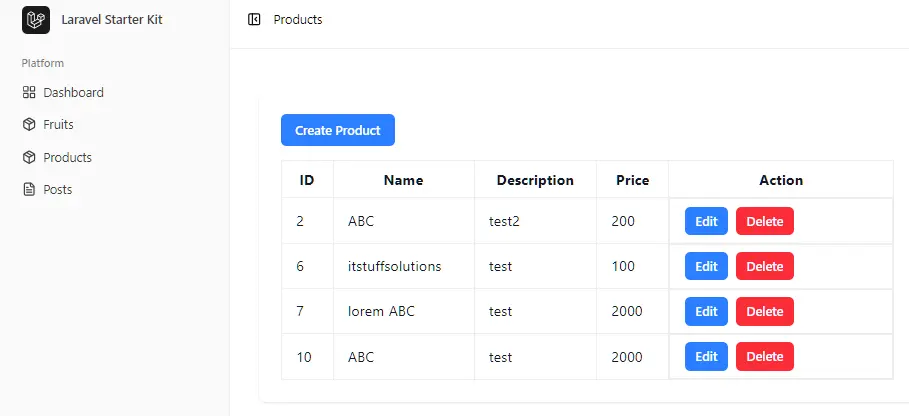
Test Product CRUD
- Create a new product
- Edit/update a product
- Delete a product
Conclusion
In this tutorial, we built a complete Product CRUD application using Laravel, Inertia.js, and Vue 3.
- Learned how to create, read, update, and delete products
- Used Inertia.js to connect backend and frontend without APIs
- Built interactive UI with Vue 3 components
- Added validation, loading states, and authentication
FAQs
Q1: What does useForm or <Form> do?
It helps send data to the server and handle:
errors
loading state
form submission
Q2: Where do errors and processing come from?
They come from the Inertia Form component slot.
Q3: Why use authentication middleware
To ensure only logged-in users can access product features.
Q4: What is Route::resource?
It automatically creates all CRUD routes for a controller.
