
In this laravel 12 tutorial, you will learn How to Fix File Uploads with PUT/PATCH in Laravel API with File Upload step by step with example.
If you have built a REST API with Laravel, you have likely encountered a frustrating issue: your POST requests work perfectly for creating resources with file uploads, but when you try to update them using PUT or PATCH, the file vanishes. The $request->file(‘image’) returns null, and your validation fails.
This is not a bug in your code, nor is it a bug in Laravel. It is a fundamental limitation of PHP.
This article explains why this happens and provides the standard “Method Spoofing” solution to fix it.
Table of Contents
The Problem: PHP and multipart/form-data
When you upload a file, your browser (or API client) sends the data using the multipart/form-data content type.
The core issue is that PHP only parses multipart/form-data payloads for POST requests. If you send a multipart/form-data body with a PUT or PATCH request method, PHP discards the body, leaving the $_FILES array (and consequently Laravel’s $request->file()) empty.
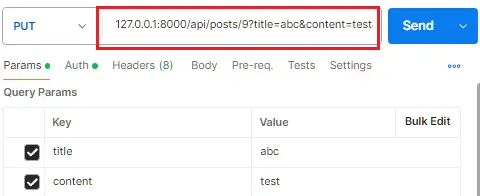
Why Query Params Work But Form-Data Doesn’t
If you use query parameters (the Params tab in Postman) instead of the body, it works fine because query strings are parsed independently of the HTTP method. However, this is semantically incorrect for file uploads and isn’t a practical workaround.
The Solution: Method Spoofing
The standard Laravel solution is Method Spoofing. You must technically send a POST request so PHP can parse the file, but you tell Laravel to treat it as a PUT request for routing purposes.
You can do this by adding a special field called _method to your request body.
Read Also : Laravel 12 REST API Authentication Using Sanctum with Password Reset
Step 1: Define Your Route Normally
In your routes/api.php, keep your route defined as a PUT or PATCH. You do not need to change this to POST.
<?php

use Illuminate\Http\Request;
use Illuminate\Support\Facades\Route;
use App\Http\Controllers\API\PostController;

    Route::put('posts/{id}', PostController::class);
Step 2: Write Your Controller Normally
Create a controller to handle file updates:
 // PUT/PATCH /api/posts/{post}
    public function update(Request $request,$id): JsonResponse
    {
        $validator = Validator::make($request->all(), [
            'title' => 'sometimes|required|string|max:255',
            'content'  => 'sometimes|required|string',
            'image'  => 'nullable|image|mimes:jpeg,png,jpg|max:2048',
            'status'  => 'sometimes|required|digits:1',
        ]);

        if ($validator->fails()) {
            return response()->json([
                'success' => false,
                'message' => 'Validation error.',
                'errors'  => $validator->errors(),
            ], 422);
        }


        $post = Post::find($id);

        if (is_null($post)) {
            return response()->json([
                'status'  => false,
                'message' => 'Post not found'
            ], 404);
        }

        $postData = $validator->validated();

        // Handle image upload
        if ($request->hasFile('image')) {
            $old_image = public_path($post->image);
            // Delete old image if exists
            if (File::exists($old_image)) {
                File::delete($old_image);
            }

            $image = $request->file('image');

            // Generate a unique name
            $imageName = time() . '.' . $image->getClientOriginalExtension();

            // Define the destination path within the public folder
            $destinationPath = public_path('posts'); // Creates 'public/posts'

            // Move the uploaded file to the public folder
            $image->move($destinationPath, $imageName);

            $postData['image'] = 'posts/'.$imageName;
        }


        $post->update($postData);

        return response()->json([
            'success' => true,
            'data'    => new PostResource($post),
            'message' => 'Post updated successfully.',
        ]);
    }
Step 3: Configure Postman to Use Method Spoofing
To update a file via “PUT/PATCH” in Postman, you should not send a real PUT/PATCH with multipart. Instead, you send a POST with _method:
- Set method to POST (not PUT/PATCH) in Postman.
- Set URL: http://127.0.0.1:8000/api/posts/1 (replace 1 with the real ID).
- Go to Body > form-data.
- Add form-data keys:
- _method : PUT (or PATCH)
- file : set type to File, then choose the file from your system
- Ensure no conflicting Content-Type header is manually set; let Postman set multipart/form-data automatically.
On the Laravel side:
- PHP parses the multipart POST, populating $_FILES and $_POST.
- Laravel sees _method=PUT and changes the internal request method to PUT.
- Your Route::put(‘posts/{id}’, …) route is matched, and $request->file(‘image’) works as expected.
Read Also : Laravel 12 Reset Password Using OTP Sanctum API Example
Step 4: Testing the Update in Postman
Once everything is configured. Now Enter your API URL (http://127.0.0.1:8000/api/posts/9).
Go to the Body Tab
Click on the Body tab in Postman.
Select form-data
Click on the radio button for form-data (not raw, not binary).
Add the _method Field
In the form-data table, add a new key-value pair: _method : PUT
This tells Laravel to treat this POST request as a PUT request internally.
Add Your Other Form Fields
For the file row:
- Set the Type dropdown to File (it will auto-detect if you start typing a filename).
- Click the file input field and select a file from your computer.
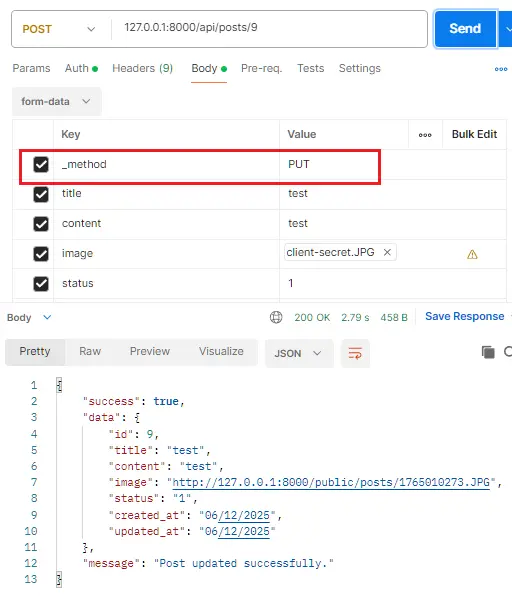
Laravel’s routing engine will see the _method parameter, intercept the request, and route it to your Route::put(…) definition, but PHP will have already safely parsed the file because it entered as a POST.
Conclusion
Handling file uploads with PUT or PATCH requests in a Laravel API can be confusing, especially when everything works with POST but suddenly fails during updates. The truth is—this issue has nothing to do with your Laravel code. It is simply a limitation of PHP itself, which only processes multipart/form-data for POST requests, leaving PUT/PATCH requests without any file data.
Laravel solves this problem elegantly through Method Spoofing, allowing you to send a POST request (so PHP can parse the file) while still telling Laravel to treat it as a PUT or PATCH operation. By using the _method field in Postman or any client, your file uploads will work perfectly while maintaining correct RESTful practices.
With this approach, you can reliably update text fields and files at the same time, avoid validation errors, and keep your API consistent. Whether you’re updating images, documents, or any type of file, the combination of POST + _method=PUT ensures your Laravel API behaves exactly as expected.
