
If you’re building a web application, chances are you’ve worked with pagination. But here’s the tricky part—How to Show Pagination with Serial Number in Laravel?
Displaying serial numbers correctly across paginated pages can feel confusing at first. When you move to page 2, the numbering often resets to 1. That’s not ideal, right?
In this Laravel tutorial, you’ll learn how to solve this issue step-by-step using Laravel’s built-in pagination system. We’ll cover controllers, Blade templates, logic calculation, best practices, and real-world examples.
Table of Contents
What We Are Building
Assume a simple example:
- A users table
- A UserController that lists users with pagination
- A Blade view that shows a table with a Serial No (S.No) column
Goal: When you are on page 1, S.No should be 1–10; page 2 → 11–20; page 3 → 21–30, etc.
Basic Setup for Pagination in Laravel
Let’s build a simple example.
Step 1: Create Controller
In this step, we will run the following Artisan command to create a new controller:
php artisan make:controller UserController
Open app/Http/Controllers/UserController.php:
<?php

namespace App\Http\Controllers;

use Illuminate\Http\Request;
use App\Models\User;

class UserController extends Controller
{
    public function index(Request $request){

        $users = User::orderBy("id")->paginate(5);

        return view('users',compact('users'));
    }

}
Step 2: Creating Routes
Open routes/web.php
<?php

use Illuminate\Support\Facades\Route;
use App\Http\Controllers\UserController;

Route::get('users/list', [UserController::class,'index']);
Step 3: Blade View Setup
Create resources/views/users.blade.php
<!DOCTYPE html>
<html>
<head>
    <title>How to Show Pagination with Serial Number in Laravel</title>
    <link href="https://cdn.jsdelivr.net/npm/bootstrap@5.3.8/dist/css/bootstrap.min.css" rel="stylesheet">
</head>
<body>
    <div class="container mt-5">
        <div class="card">
            <h5 class="card-header bg-primary text-white">How to Show Pagination with Serial Number in Laravel - ItStuffSolutiotions</h5>
            <div class="card-body ">
                <div class="table_data">
                 <table class="table table-bordered ">
                    <thead>
                        <tr>
                            <th>#</th>
                            <th>Name</th>
                            <th>Email</th>
                            <th>Created At</th>
                            <th>Updated At</th>
                        </tr>
                    </thead>
                        @forelse($users as $key=>$user)
                    <tr>
                        <td>{{ ++$key }}</td>
                        <td>{{ $user->name }}</td>
                        <td>{{ $user->email }}</td>
                        <td>{{ $user->created_at->format('d M Y') }}</td>
                        <td>{{ $user->updated_at->format('d M Y') }}</td>
                    </tr>
                    @empty
                    <tr>
                        <td colspan="5" class="text-center">No Users Found!!</td>
                    </tr>
                    @endforelse
                </table>
                    <!-- Pagination -->
                {!! $users->withQueryString()->links('pagination::bootstrap-5') !!}
               </div>
            </div>
        </div>
    </div>
    <script src="https://cdn.jsdelivr.net/npm/bootstrap@5.3.8/dist/js/bootstrap.bundle.min.js"></script>


</body>

</html>
Read Also : Laravel 12 Pagination Using jQuery AJAX Step-by-Step Guide
Method 1: Using firstItem() and $loop->index
Use the simple method below to display the serial number:
<td>{{ $users->firstItem()+$loop->index }}</td>
Full view code:
<!DOCTYPE html>
<html>
<head>
    <title>How to Show Pagination with Serial Number in Laravel</title>
    <link href="https://cdn.jsdelivr.net/npm/bootstrap@5.3.8/dist/css/bootstrap.min.css" rel="stylesheet">
</head>
<body>
    <div class="container mt-5">
        <div class="card">
            <h5 class="card-header bg-primary text-white">How to Show Pagination with Serial Number in Laravel - ItStuffSolutiotions</h5>
            <div class="card-body ">
                <div class="table_data">
                 <table class="table table-bordered ">
                    <thead>
                        <tr>
                            <th>#</th>
                            <th>Name</th>
                            <th>Email</th>
                            <th>Created At</th>
                            <th>Updated At</th>
                        </tr>
                    </thead>
                    @forelse($users as $key=>$user)
                    <tr>
                        <td>{{ $users->firstItem()+$loop->index }}</td>
                        <td>{{ $user->name }}</td>
                        <td>{{ $user->email }}</td>
                        <td>{{ $user->created_at->format('d M Y') }}</td>
                        <td>{{ $user->updated_at->format('d M Y') }}</td>
                    </tr>
                    @empty
                    <tr>
                        <td colspan="5" class="text-center">No Users Found!!</td>
                    </tr>
                    @endforelse
                </table>
                    <!-- Pagination -->
                {!! $users->withQueryString()->links('pagination::bootstrap-5') !!}
               </div>
            </div>
        </div>
    </div>
    <script src="https://cdn.jsdelivr.net/npm/bootstrap@5.3.8/dist/js/bootstrap.bundle.min.js"></script>


</body>

</html>
Why This Works
- firstItem() returns the first record number of current page
- $loop->index starts from 0
This is the recommended approach.
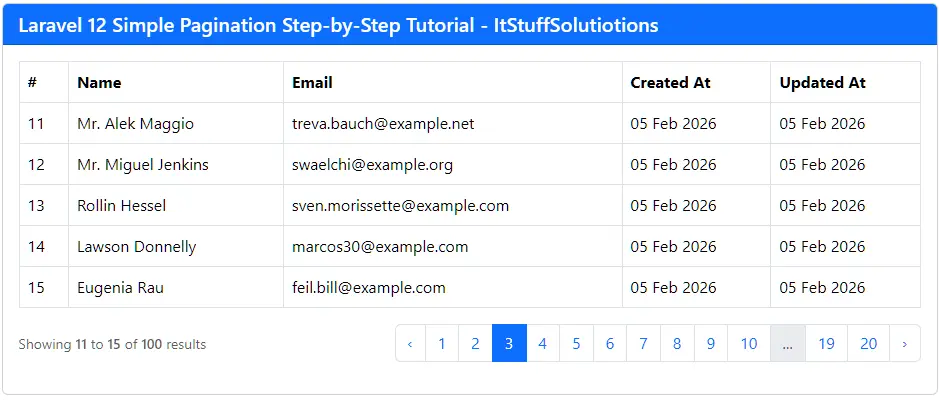
Method 2: Laravel Pagination with Serial Number Using $loop->iteration
If you prefer to use currentPage() and perPage(), you can do:
<td>
    {{ ($users->currentPage() - 1) * $users->perPage() + $loop->iteration }}
</td>
Full view code:
<!DOCTYPE html>
<html>
<head>
    <title>How to Show Pagination with Serial Number in Laravel</title>
    <link href="https://cdn.jsdelivr.net/npm/bootstrap@5.3.8/dist/css/bootstrap.min.css" rel="stylesheet">
</head>
<body>
    <div class="container mt-5">
        <div class="card">
            <h5 class="card-header bg-primary text-white">How to Show Pagination with Serial Number in Laravel - ItStuffSolutiotions</h5>
            <div class="card-body ">
                <div class="table_data">
                 <table class="table table-bordered ">
                    <thead>
                        <tr>
                            <th>#</th>
                            <th>Name</th>
                            <th>Email</th>
                            <th>Created At</th>
                            <th>Updated At</th>
                        </tr>
                    </thead>
                    @forelse($users as $key=>$user)
                    <tr>
                        <td>{{ ($users->currentPage() - 1) * $users->perPage() + $loop->iteration }}</td>
                        <td>{{ $user->name }}</td>
                        <td>{{ $user->email }}</td>
                        <td>{{ $user->created_at->format('d M Y') }}</td>
                        <td>{{ $user->updated_at->format('d M Y') }}</td>
                    </tr>
                    @empty
                    <tr>
                        <td colspan="5" class="text-center">No Users Found!!</td>
                    </tr>
                    @endforelse
                </table>
                    <!-- Pagination -->
                {!! $users->withQueryString()->links('pagination::bootstrap-5') !!}
               </div>
            </div>
        </div>
    </div>
    <script src="https://cdn.jsdelivr.net/npm/bootstrap@5.3.8/dist/js/bootstrap.bundle.min.js"></script>


</body>

</html>
Explanation
- (currentPage() – 1) * perPage(): total records before the current page
- + $loop->iteration: position within the current page (starting from 1)
This gives the same result but is slightly more verbose than using firstItem() + $loop->index.
Common Mistakes to Avoid
- Using $loop->iteration alone
- Forgetting firstItem() method
- Not handling empty results
Conclusion
To show a proper serial number column with Laravel pagination:
- Use paginate() / simplePaginate() in the controller.
- In your Blade @foreach, combine firstItem() with $loop->index.
Final, recommended line to remember:
{{ $users->firstItem()+$loop->index }}
This small change gives you clean, continuous serial numbers across all paginated pages with minimal code and maximum clarity.
FAQs
Q1: What is the best way to show pagination with serial number in Laravel?
Use $users->firstItem() + $loop->index.
Q2: Can I use simplePaginate() for serial numbers?
Yes, but total page calculation may differ.
Q3: Does cursorPaginate() support serial numbers?
Yes, but numbering logic may need custom handling.
