
Modern web applications demand speed, responsiveness, and seamless user experiences. Reloading pages after every action feels outdated. That’s where Laravel 12 AJAX CRUD Operation: Step-by-Step Guide becomes essential. By combining Laravel 12 with AJAX, you can create Create, Read, Update, and Delete (CRUD) operations without refreshing the page.
In this guide, you’ll learn how to implement AJAX CRUD in Laravel 12 step by step, using best practices, clean code, and real-world examples. Whether you’re a beginner or an experienced Laravel developer, this tutorial will help you master dynamic CRUD operations.
Table of Contents
What Is AJAX CRUD in Laravel 12?
AJAX (Asynchronous JavaScript and XML) allows data to be sent and retrieved from the server asynchronously. When paired with Laravel 12:
- Create records without reloading pages
- Read data dynamically
- Update records instantly
- Delete records with confirmation prompts
Benefits of Using AJAX CRUD
- Faster user interactions
- Improved performance
- Better UX/UI
- Reduced server load
Prerequisites for Laravel 12 AJAX CRUD Operation
Before starting this Laravel 12 AJAX CRUD Operation: Step-by-Step Guide, ensure you have:
- PHP 8.2 or higher
- Composer installed
- Laravel 12 installed
- Basic knowledge of Laravel MVC
- Familiarity with jQuery & Bootstrap
Step 1: Install Laravel 12 Project
If you already have a Laravel 12 project, you can skip this step.
composer create-project laravel/laravel laravel-12-ajax-crud
cd laravel-12-ajax-crud
Run the built-in server:
php artisan serve
Your app should be available at http://127.0.0.1:8000. Now open your browser and confirm the application is running.
Step 2: Configure Database
Edit the .env file and update your DB credentials:
DB_CONNECTION=mysql
DB_HOST=127.0.0.1
DB_PORT=3306
DB_DATABASE=laravel_12_ajax_crud
DB_USERNAME=root
DB_PASSWORD=
Step 3: Create Model and Migration
Use Artisan to generate the model with a migration:
php artisan make:model Post -m
Open the generated migration in database/migrations/xxxx_xx_xx_xxxxxx_create_posts_table.php :
<?php

use Illuminate\Database\Migrations\Migration;
use Illuminate\Database\Schema\Blueprint;
use Illuminate\Support\Facades\Schema;

return new class extends Migration
{
    /**
     * Run the migrations.
     */
    public function up(): void
    {
        Schema::create('posts', function (Blueprint $table) {
            $table->id();
             $table->string('title');
            $table->text('description')->nullable();
            $table->string('author')->nullable();
            $table->string('slug')->unique();
            $table->string('status')->default('draft'); // draft, published
            $table->timestamp('published_at')->nullable();
            $table->timestamps();
        });
    }

    /**
     * Reverse the migrations.
     */
    public function down(): void
    {
        Schema::dropIfExists('posts');
    }
};
Run the migration:
php artisan migrate
Update the Post model in app/Models/Post.php:
<?php

namespace App\Models;

use Illuminate\Database\Eloquent\Model;
use Illuminate\Database\Eloquent\Factories\HasFactory;

class Post extends Model
{

   use HasFactory;

    protected $fillable = [
        'title'       ,
        'description'  ,
        'author'      ,
        'slug'         ,
        'status'     ,
        'published_at' ,
        'created_at'   ,
        'updated_at'   ,
    ];
}
Step 4: Create Controller for AJAX CRUD
Generate a resource controller:
php artisan make:controller PostController -r --model=Post
Here -r represents resource and –model=post use to specify use post controller . Open app/Http/Controllers/PostController.php and add the following:
<?php

namespace App\Http\Controllers;

use App\Models\Post;
use Illuminate\Http\Request;
use Illuminate\Support\Str;

class PostController extends Controller
{
    /**
     * Display a listing of the resource.
     */
    public function index(Request $request)
    {
        $posts = Post::latest()->paginate(5);

        if($request->ajax())
        {
            return view('posts.pagination', compact('posts'))->render();
        }

        return view('posts.list',compact('posts'));
    }


    /**
     * Store a newly created resource in storage.
     */
    public function store(Request $request)
    {
        $request->validate([
            'title' => 'required',
            'description' => 'required',
            'status' =>'required'
        ]);

        Post::create([
            'title' => $request->title,
            'description' => $request->description,
            'slug' =>Str::slug($request->title),
            'status' =>$request->status
        ]);

        return response()->json(['success' => 'Post created successfully.']);
    }

    /**
     * Display the specified resource.
     */
    public function show(Post $post)
    {
        return response()->json($post);
    }


    /**
     * Update the specified resource in storage.
     */
    public function update(Request $request, Post $post)
    {
         $request->validate([
            'title' => 'required',
            'description' => 'required',
            'status' =>'required'
        ]);

        $post->update($request->all());

        return response()->json($post);
    }

    /**
     * Remove the specified resource from storage.
     */
    public function destroy(Post $post)
    {
        $post->delete();

        return response()->json(['success'=>'Post deleted successfully.']);
    }
}
Explanation
- index() Method
- Fetches posts from database and Shows only 5 posts per page (pagination)
- if($request->ajax()) Checks if the request is coming from AJAX return to pagination.blade.php
- store(Request $request) Method
- Input validation & stops execution if validation fails
- Inserts new record into database
- Converts title into URL-friendly slug
- show(Post $post) Method
- Returns single post data in JSON format
- update(Request $request, Post $post) Method
- Updates post with new values
- $post automatically injected via route model binding
- destroy(Post $post) Method
- Deletes the post from database
Step 5: Define Routes
Open routes/web.php and add the routes:
<?php

use Illuminate\Support\Facades\Route;
use App\Http\Controllers\PostController;

Route::controller(PostController::class)->group(function () {
    Route::get('/posts', 'index')->name('posts.index');
    Route::post('/posts', 'store')->name('posts.store');
    Route::get('/posts/{post}', 'show')->name('posts.show');
    Route::post('/posts/{post}', 'update')->name('posts.update');
    Route::delete('/posts/{post}', 'destroy')->name('posts.destroy');
});
Read Also : Laravel 12 Simple Pagination Step-by-Step Tutorial
Step 6: Create Blade View with Bootstrap Modal
Create the view file: resources/views/posts/list.blade.php
<!DOCTYPE html>
<html>
<head>
    <title>Laravel 12 AJAX CRUD Operation: Step-by-Step Guide</title>
    <link href="https://cdn.jsdelivr.net/npm/bootstrap@5.3.8/dist/css/bootstrap.min.css" rel="stylesheet">
    <link rel="stylesheet" href="https://cdnjs.cloudflare.com/ajax/libs/font-awesome/6.5.1/css/all.min.css" />
    <meta name="csrf-token" content="{{ csrf_token() }}">
</head>
<body>
    <div class="container mt-5">
        <div class="card">
            <h5 class="card-header bg-primary text-white">Laravel 12 AJAX CRUD Operation: Step-by-Step Guide - ItStuffSolutiotions</h5>

            <div class="card-body ">
                <button class="btn btn-primary btn-sm mb-3" data-bs-toggle="modal" data-bs-target="#create_post_modal"><i class='fa-regular fa-plus'></i> Create Post
                </button>
                <div class="alert alert-success print-success-msg" style="display:none">
                    </div>
                <div class="table_data">
                  @include('posts.pagination')
               </div>
            </div>
        </div>
    </div>
    @include('posts.create')
    @include('posts.edit')
    @include('posts.show')
    <script src="https://cdn.jsdelivr.net/npm/bootstrap@5.3.8/dist/js/bootstrap.bundle.min.js"></script>
     <script src="https://code.jquery.com/jquery-3.6.0.min.js"></script>


  <script type="text/javascript">
    $(document).ready(function(){

    $(document).on('click', '.pagination a', function(event){
        event.preventDefault();
        var page = $(this).attr('href').split('page=')[1];
        get_data(page);
    });

        /* ------------------------------------------
    --------------------------------------------
      Fetch Posts page wise function
    --------------------------------------------
    --------------------------------------------*/
    function get_data(page)
    {
        $.ajax({
            url:"{{route('posts.index')}}?page="+page,
            success:function(data)
            {
                $('.table_data').html(data);
            }
       });
    }
    });

        /* ------------------------------------------
    --------------------------------------------
      Fetch All Posts  function
    --------------------------------------------
    --------------------------------------------*/

    function fetch_all_data()
    {
        $.ajax({
            url:"{{route('posts.index')}}",
            success:function(data)
            {
                $('.table_data').html(data);
            }
       });
    }


    /* ------------------------------------------
    --------------------------------------------
      Add Form function
    --------------------------------------------
    --------------------------------------------*/

    $('#add_post_form').submit(function(e) {
        e.preventDefault();

        var url = "/posts";
        let formData = new FormData(this);

            $.ajax({
                type:'POST',
                url: url,
                data: formData,
                contentType: false,
                processData: false,
                success: (response) => {
                    alert("Post created Successfully!");
                    $('#create_post_modal').modal('hide');
                    $('#add_post_form').trigger("reset");
                    fetch_all_data();
                },
                error: function(response){
                     if (response.status === 422) {

                        $('#add_post_form').find(".print-error-msg").find("ul").html('');
                        $('#add_post_form').find(".print-error-msg").show();

                        $.each( response.responseJSON.errors, function( key, value ) {
                            $('#add_post_form').find(".print-error-msg").find("ul").append('<li>'+value+'</li>');
                        });

                    }
                    else {
                    alert('Something went wrong. Please try again.');
                    console.error(response.responseJSON);
                }
                }
           });
    });


     /*------------------------------------------
    --------------------------------------------
      Edit  function
    --------------------------------------------
    --------------------------------------------*/
        function editPost(id){

            var url = "/posts/"+id;
            $.get(url, function(data) {
                $('#edit_post_modal').modal('show');
                $('#edit_post_modal .id').val(data.id);
                $('#edit_post_modal .title').val(data.title);
                $('#edit_post_modal .status').val(data.status);
                $('#edit_post_modal .description').text(data.description);
            });
       }

           /* ------------------------------------------
    --------------------------------------------
      Update  function
    --------------------------------------------
    --------------------------------------------*/

        $('#edit_form').submit(function(e) {
        e.preventDefault();

        var url = "/posts/"+$('.id').val();
        let formData = new FormData(this);

            $.ajax({
                type:'POST',
                url: url,
                data: formData,
                contentType: false,
                processData: false,
                success: (response) => {
                    alert('Post Updated Successfully');
                    $('#edit_post_modal').modal('hide');
                    $('#edit_form').trigger("reset");
                    fetch_all_data();
                },
                error: function(response){
                    if (response.status === 422) {

                        $('#edit_form').find(".print-error-msg").find("ul").html('');
                        $('#edit_form').find(".print-error-msg").show();

                        $.each( response.responseJSON.errors, function( key, value ) {
                            $('#edit_form').find(".print-error-msg").find("ul").append('<li>'+value+'</li>');
                        });
                  }
                  else {
                    alert('Something went wrong. Please try again.');
                    console.error(response.responseJSON);
                }
                }
           });
    });

        /* ------------------------------------------
    --------------------------------------------
      Show  function
    --------------------------------------------
    --------------------------------------------*/
    function showPost(id){

        var url = "/posts/"+id;
        $.get(url, function(data) {
            $('#show_modal').modal('show');
            $('#show_modal .title').text(data.title);
            $('#show_modal .status').text(data.status);
            $('#show_modal .description').text(data.description);
        });
    }
  /*------------------------------------------
    --------------------------------------------
      delete  function
    --------------------------------------------
    --------------------------------------------*/
       function deletePost(id){

        confirm("Are You sure want to delete?");

            $.ajax({
            type: "DELETE",
            url: "posts/"+id,
            data: { _token: "{{ csrf_token() }}" },
            success: function (data) {
                fetch_all_data();
            },
            error: function (data) {
                console.error(data);
            }
        });
    }

</script>

</body>

</html>
Explanation
- We used Bootstrap 5.3 CDN for the user interface design and layout styling.
- We used Font Awesome CDN to display icons (such as the plus icon in the Create button).
- The directive @include(‘posts.pagination’) is used to load the posts table dynamically.
- AJAX replaces this content without refreshing the entire page.
- This is mainly used for pagination updates to provide a smooth user experience.
- Modal views are created in separate files to keep the main file clean, organized, and maintainable.
- Create modal: @include(‘posts.create’)
- Edit modal: @include(‘posts.edit’)
- Show modal: @include(‘posts.show’)
- The function get_data(page) fetches posts page-by-page using AJAX pagination.
- The function fetch_all_data() reloads the complete posts list dynamically.
- It is used after create, update, and delete operations to refresh the table.
Create Post Process
- The $(‘#add_post_form’).submit() function handles the Create Post form submission using AJAX.
- FormData(this) is used to collect form input values.
- A POST request is sent to the
storemethod. - On Success:
- Displays a success alert
- Closes the modal
- Resets the form
- Reloads the posts table
- On Validation Error (422):
- Displays validation error messages inside the form
- The Edit, Update, and Show functionalities work in a similar way using AJAX requests to fetch, modify, and display data dynamically without page reload.
Create resources/views/posts/pagination.blade.php
  <table class="table table-bordered ">
    <thead>
        <tr>
            <th>#</th>
            <th>Title</th>
            <th>Status</th>
            <th>Slug</th>
            <th>Action</th>
        </tr>
    </thead>
        @forelse($posts as $key=> $post)
    <tr>
        <td>{{ $posts->firstItem() + $key }}</td>
        <td>{{ $post->title }}</td>
        <td>{{ $post->status }}</td>
        <td>{{ $post->slug }}</td>
        <td>
            <button class="btn btn-primary btn-sm edit" onclick="editPost({{$post->id}})"><i class='fa-regular fa-pen-to-square'></i> Edit
            </button> |
            <button class="btn btn-success btn-sm show" onclick="showPost({{$post->id}})"><i class="fa-regular fa-eye"></i>  Show
            </button> |
            <button class="btn btn-danger btn-sm delete" onclick="deletePost({{$post->id}})"><i class="fa-solid fa-trash"></i> Delete
           </button>
        </td>
    </tr>
    @empty
    <tr>
        <td colspan="5" class="text-center">No Posts Found!!</td>
    </tr>
    @endforelse
</table>
    <!-- Pagination -->
{!! $posts->withQueryString()->links('pagination::bootstrap-5') !!}
Explanation
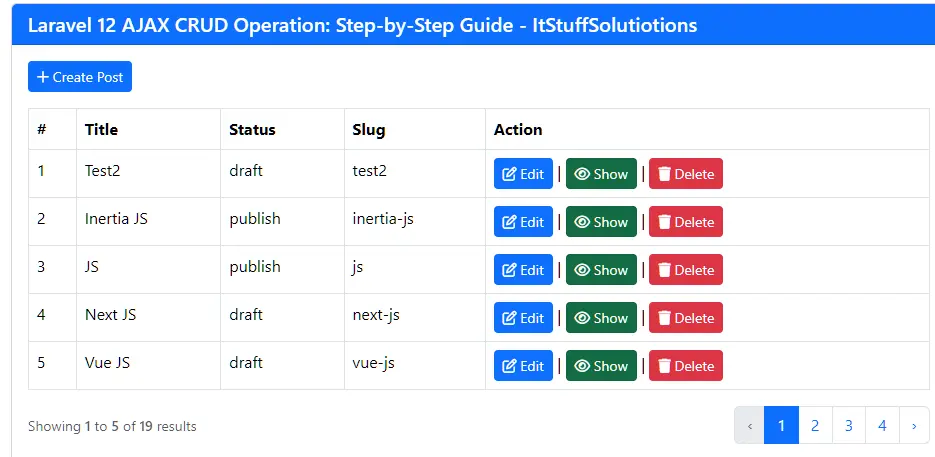
This file is used to display the posts table dynamically. It loads the paginated data and is refreshed through AJAX, allowing the table content to update without reloading the entire page.
Create resources/views/posts/create.blade.php
  <!--Create modal -->
     <div class="modal fade" id="create_post_modal" tabindex="-1" aria-labelledby="exampleModalLabel" aria-hidden="true">
        <div class="modal-dialog">
            <div class="modal-content">
            <div class="modal-header">
                <h1 class="modal-title fs-5" id="exampleModalLabel">Create Post</h1>
                <button type="button" class="btn-close" data-bs-dismiss="modal" aria-label="Close"></button>
            </div>
            <div class="modal-body">
                <form method="post" enctype="multipart/form-data" id="add_post_form">
                    @csrf
                   <div class="alert alert-danger print-error-msg" style="display:none">
                        <ul></ul>
                    </div>

                <div class="mb-3">
                    <label>Post Title</label>
                        <input type="text" name="title" class="form-control" value=""/>
                </div>

                <div class="mb-3">
                    <label>Status</label>
                      <select class="form-control" name="status">
                        <option value="draft">draft</option>
                        <option value="publish">publish</option>
                      </select>
                </div>
                <div class="mb-3">
                    <label>Description</label>
                    <textarea  name="description" class="form-control">
                    </textarea>
                </div>
                <div class="mb-3 text-center">
                    <button class="btn btn-success btn-submit" type="submit" ><i class="fa fa-save"></i> Save Post</button>
                </div>
             </form>
            </div>

            </div>
        </div>
    </div>
     <!-- End -->
Explanation
- Contains the Create Post modal form.
- Includes input fields like title, description, and status.
Create resources/views/posts/edit.blade.php
  <!--Edit modal -->
     <div class="modal fade" id="edit_post_modal" tabindex="-1" aria-labelledby="exampleModalLabel" aria-hidden="true">
        <div class="modal-dialog">
            <div class="modal-content">
            <div class="modal-header">
                <h1 class="modal-title fs-5" id="exampleModalLabel">Edit Post</h1>
                <button type="button" class="btn-close" data-bs-dismiss="modal" aria-label="Close"></button>
            </div>
            <div class="modal-body">
                <form method="post" enctype="multipart/form-data" id="edit_form">
                    @csrf
                <input type="hidden" name="id" class="form-control id" value=""/>
                <div class="alert alert-danger print-error-msg" style="display:none">
                        <ul></ul>
                    </div>
                <div class="mb-3">
                    <label>Post Title</label>
                        <input type="text" name="title" class="form-control title" value=""/>
                </div>

                <div class="mb-3">
                    <label>Status</label>
                      <select class="form-control status" name="status">
                        <option value="draft">draft</option>
                        <option value="publish">publish</option>
                      </select>
                </div>
                <div class="mb-3">
                    <label>Description</label>
                    <textarea name="description" class="form-control description">
                    </textarea>
                </div>
                <div class="mb-3 text-center">
                   <button class="btn btn-success btn-submit" type="submit"  ><i class="fa fa-save"></i> Update Post</button>
                </div>
             </form>
            </div>

            </div>
        </div>
    </div>
     <!-- End -->
Explanation
- Contains the Edit Post modal form.
- Form fields are pre-filled using AJAX when Edit is clicked.
Create resources/views/posts/show.blade.php
  <!--Show modal -->
     <div class="modal fade" id="show_modal" tabindex="-1" aria-labelledby="exampleModalLabel" aria-hidden="true">
        <div class="modal-dialog">
            <div class="modal-content">
            <div class="modal-header">
                <h1 class="modal-title fs-5" id="exampleModalLabel"><i class="fa-regular fa-eye"></i>  Show Post</h1>
                <button type="button" class="btn-close" data-bs-dismiss="modal" aria-label="Close"></button>
            </div>
            <div class="modal-body">
                 <p><strong>Title:</strong> <span class="title"></span></p>
                 <p><strong>Status:</strong> <span class="status"></span></p>
                <p><strong>Description:</strong> <span class="description"></span></p>
            </div>

            </div>
        </div>
    </div>
     <!-- End -->
Explanation
- Contains the Show Post modal.
- Displays post details (title, description, status).
Read Also : Laravel 12 Yajra DataTables Tutorial Step-by-Step Guide
Step 7: Test the AJAX CRUD Flow
Run the command given below to start laravel development server:
php artisan serve
Visit http://127.0.0.1:8000/posts
- Click “+ Create Post”:
- Fill Title ,Status and Description
- Click Save Post
- The modal closes and a new row appears in the table (no page reload)
- Click Edit:
- Modal opens with existing data
- Update and Save – row updates immediately
- Click Delete:
- Confirm the dialog
- Row is removed via AJAX
- Click Show:
- Model Open with existing data
All four CRUD operations now work via AJAX on a single page.
Security Best Practices
- Always use CSRF tokens
- Validate input server-side
- Sanitize user data
- Use route model binding where possible
Common Issues and Fixes
419 Error (Page Expired)
A 419 error in Laravel usually means: CSRF Token Mismatch.
Laravel protects forms using CSRF tokens. If your AJAX request does not send the token properly, Laravel rejects the request.
AJAX not firing
If you click a button and nothing happens, your AJAX may not be running at all.
Data not saving
Sometimes AJAX runs successfully, but data does not save in database. If validation fails, Laravel blocks saving. Check Network tab > Response to see validation errors.
Conclusion
This Laravel 12 AJAX CRUD Operation: Step-by-Step Guide shows how to build fast, modern, and interactive CRUD applications using Laravel 12 and AJAX. By following this guide, you now have a strong foundation to build scalable, user-friendly Laravel applications.
To go further, explore:
- Laravel APIs
- Vue/React integration
- Advanced validation
- Role-based access control
FAQs – Laravel 12 AJAX CRUD Operation
Q1: Is AJAX necessary for CRUD in Laravel 12?
No, but it improves performance and user experience.
Q2: Can I use Fetch API instead of jQuery?
Yes, Fetch API works perfectly with Laravel 12.
Q3: Is Laravel 12 AJAX CRUD secure?
Yes, if you validate inputs and use CSRF protection.
Q4: Can I use Vue or React instead?
Absolutely. Laravel works great with frontend frameworks.
Q5: Is this approach suitable for large projects?
Yes, with proper architecture and API separation.
