In this Laravel guide titled “Laravel 12 CRUD With Vue JS 3 Tutorial Step-by-Step Guide”, you’ll learn how to build a complete CRUD (Create, Read, Update, Delete) application using Laravel 12 and Vue.js 3.
Building a modern web application requires a powerful backend and a reactive frontend. In this tutorial, you’ll learn how to build a complete CRUD (Create, Read, Update, Delete) application using Laravel 12 as the backend API and Vue.js 3 as the frontend.
By the end of this guide, you’ll have a fully functional CRUD system with Laravel 12 and Vue 3 working together smoothly.
Table of Contents
What We’ll Build
We’ll create a simple Post Management System where users can:
- Create a new post
- View post
- Edit a post
- Delete a post
- List all posts
Tech Stack:
- Laravel 12 (REST API)
- Vue JS 3 (Composition API)
- Axios (HTTP requests)
- MySQL (Database)
- SweetAlert2 For flash message
Prerequisites
Ensure the following are installed on your system:
- PHP 8.2 or higher
- Composer
- Node.js (v18+) and npm
- Basic knowledge of Laravel and Vue.js
Check versions:
php -v
composer -V
node -v
npm -v
Step 1: Install New Laravel Project
Run the command below to create a new Laravel project:
composer create-project laravel/laravel laravel-12-vue-crud
cd laravel-12-vue-crud
Step 2: Configure Database
Open .env file and update database settings:
DB_DATABASE=laravel
DB_USERNAME=root
DB_PASSWORD=
Step 3: Install Laravel/UI Package
Run the following command using Composer:
composer require laravel/ui
Now, run the following command to generate the basic Vue.js scaffolding in your Laravel project:
php artisan ui vue
Step 4: Install Frontend Dependencies and Compile Assets
After installing the UI package, when I ran npm install, I encountered the following dependency error:
npm ERR! node_modules/vite
npm ERR! dev vite@”^7.0.7″ from the root projectnpm ERR! Could not resolve dependency:
npm ERR! peer vite@”^4.0.0 || ^5.0.0″ from @vitejs/plugin-vue@4.6.2
npm ERR! node_modules/@vitejs/plugin-vue
npm ERR! dev @vitejs/plugin-vue@”^4.5.0″ from the root project
This issue occurs because the installed version of Vite (v7) is not compatible with the older version of @vitejs/plugin-vue.
To resolve the problem, update the @vitejs/plugin-vue version in your package.json file:
"@vitejs/plugin-vue": "^6.0.0",
After updating the version, run the following command again:
npm install
This should resolve the dependency conflict and complete the installation successfully. After the installation is complete, compile the frontend assets by running:
npm run dev
Next, we will install the Laravel Sanctum package. In Laravel 12, the api.php route file is not available by default. To generate the API routes file, we need to install using the following command.
php artisan install:api
This command automatically:
- Installs Laravel Sanctum package
- Creates the api.php routes file
- Publishes Sanctum configuration
- Creates the personal_access_tokens migration table
Run the migrations to create necessary database tables:
php artisan migrate
Next, install SweetAlert2 to enable toast-style notifications for posts.
Open your terminal and run the following command to add SweetAlert2 to your project:
npm install sweetalert2
Create a new file at resources/js/services/alert.js, then add the following code to it:
import Swal from 'sweetalert2'

// Toast
export const Toast = Swal.mixin({
    toast: true,
    position: 'top-end',
    showConfirmButton: false,
    timer: 3000,
    timerProgressBar: true,
    background: '#28a745',
    color: '#fff'
})

// Confirmation dialog
export const confirmDialog = (text= "You won't be able to revert this!") => {
    return Swal.fire({
        title: 'Are you sure?',
        text: text,
        icon: 'warning',
        showCancelButton: true,
        confirmButtonText: 'Yes',
        cancelButtonText: 'Cancel',
    })
}
Read Also : Laravel 12 AJAX CRUD Operation: Step-by-Step Guide
Step 5: Create Model, Migration & Controller
We will create a Post model with migration and API controller.
php artisan make:model Post -mcr
This command creates:
- Model: Post
- Migration file
- API Controller: PostController
Update Migration File
Open the generated migration in database/migrations/xxxx_xx_xx_xxxxxx_create_posts_table.php :
<?php

use Illuminate\Database\Migrations\Migration;
use Illuminate\Database\Schema\Blueprint;
use Illuminate\Support\Facades\Schema;

return new class extends Migration
{
    /**
     * Run the migrations.
     */
    public function up(): void
    {
        Schema::create('posts', function (Blueprint $table) {
            $table->id();
            $table->string("title");
            $table->text("content");
            $table->string("image");
            $table->tinyInteger("status")->default(0);
            $table->timestamps();
        });
    }

    /**
     * Reverse the migrations.
     */
    public function down(): void
    {
        Schema::dropIfExists('posts');
    }
};
Run migration:
php artisan migrate
Update Post Model
Open app/Models/Post.php and add fillable:
<?php

namespace App\Models;

use Illuminate\Database\Eloquent\Model;
use Illuminate\Database\Eloquent\Factories\HasFactory;

class Post extends Model
{
     /** @use HasFactory<\Database\Factories\UserFactory> */
    use HasFactory;

    /**
     * The attributes that are mass assignable.
     *
     * @var list<string>
     */
    protected $fillable = [
        'title',
        'content',
        'image',
        'status',
    ];
}
Step 6: Update PostController for Vue CRUD
Open app/Http/Controllers/PostController.php and add the following:
<?php

namespace App\Http\Controllers;

use App\Models\Post;
use Illuminate\Http\Request;
use File;

class PostController extends Controller
{
    /**
     * Display a listing of the resource.
     */
    public function index()
    {
        $posts = Post::latest()->paginate(10);

        return response()->json(['data'=>$posts],200);

    }

    /**
     * Store a newly created resource in storage.
     */
    public function store(Request $request)
    {
        $validated   =  $request->validate([
                'title' => 'required|string|max:255',
                'content' => 'required|string',
                'status' =>'required|string',
                'image'  => 'required|image|mimes:jpeg,png,jpg|max:2048',
            ]);


         // Handle image upload
        if ($request->hasFile('image')) {

            $image = $request->file('image');

            // Generate a unique name
            $imageName = time() . '.' . $image->getClientOriginalExtension();

            // Define the destination path within the public folder
            $destinationPath = public_path('posts'); // Creates 'public/images'

            // Move the uploaded file to the public folder
            $image->move($destinationPath, $imageName);

            $validated['image'] = 'posts/'.$imageName;
        }


        $post = Post::create($validated);

        return response()->json(['msg'=>'Post Created Successfully!'],201);
    }

    /**
     * Display the specified resource.
     */
    public function show(Post $post)
    {
        return $post;
    }

    /**
     * Update the specified resource in storage.
     */
    public function update(Request $request, Post $post)
    {
        $validated   =  $request->validate([
                'title' => 'sometimes|required|string|max:255',
                'content' => 'sometimes|required|string',
                'image'  => 'nullable|image|mimes:jpeg,png,jpg|max:2048',
                'status' =>'sometimes|required|string',
            ]);


         // Handle image upload
        if ($request->hasFile('image')) {

            $old_image = public_path($post->image);
            // Delete old image if exists
            if (File::exists($old_image)) {
                File::delete($old_image);
            }

            $image = $request->file('image');

            // Generate a unique name
            $imageName = time() . '.' . $image->getClientOriginalExtension();

            // Define the destination path within the public folder
            $destinationPath = public_path('posts'); // Creates 'public/images'

            // Move the uploaded file to the public folder
            $image->move($destinationPath, $imageName);

            $validated['image'] = 'posts/'.$imageName;
        }

        $post->update($validated);

        return response()->json(['msg'=>'Post Updated Successfully!'],204);
    }

    /**
     * Remove the specified resource from storage.
     */
    public function destroy(Post $post)
    {
        $image = public_path($post->image);
          // Delete image if exists
        if ($post->image && File::exists($image)) {
            File::delete($image);
        }

        $post->delete();
        return response()->json(['msg'=>'Post Deleted Successfully!'],200);
    }
}
Explanation
index()
- Fetches latest posts from database.
- Uses pagination (10 posts per page).
store(Request $request)
- Validates request data (title, content, status, image).
- Uploads image to public/posts folder.
- Saves image path in database.
show(Post $post)
- Displays single post data.
- Uses Laravel Route Model Binding to automatically fetch the post.
update(Request $request, Post $post)
- Validates updated fields (sometimes means optional).
- If new image uploaded:
- Deletes old image from folder.
- Uploads new image to public/posts.
- Updates post data using $post->update().
destroy(Post $post)
- Checks if post image exists.
- Deletes image file from folder.
- Deletes the post from database.
Read Also : Laravel 12 with Vue.js Complete Setup Guide for Beginners
Step 7: Create Vue Component
Create file: resources/js/components/Posts.vue
<template>
  <div class="card-body mb-2">
    <button
      class="btn btn-primary btn-sm mb-3"
      data-bs-toggle="modal"
      data-bs-target="#create_post_modal" @click="openCreate"
    >
      <i class="fa-regular fa-plus" ></i> Create Post
    </button>
    <div class="table_data">
      <table class="table table-bordered">
        <thead>
          <tr>
            <th>#</th>
            <th>Title</th>
            <th>Status</th>
            <th>Image</th>
            <th>Action</th>
          </tr>
        </thead>
        <tbody>
          <tr v-if="posts.length" v-for="(post,index) in posts" :key="post.id">
            <td>{{serial+index}}</td>
            <td>{{post.title}}</td>
            <td>{{ post.status == 1 ? 'Active' : 'Inactive'}}</td>
            <td>
             <a target="_blank" :href="post.image ? '/' + post.image : '/posts/default.jpg'">
              <img :src="post.image ? '/' + post.image : '/posts/default.jpg'" class="img img-thumbnail" width="80px"/>
             </a>
            </td>
            <td>
              <button
                class="btn btn-primary btn-sm "
               @click="editPost(post)"
              >
                <i class="fa-regular fa-pen-to-square"></i> Edit
              </button>
              |
              <button
                class="btn btn-success btn-sm show"
                @click="showPost(post)">
                <i class="fa-regular fa-eye"></i> Show
              </button>
              |
              <button class="btn btn-danger btn-sm delete" @click="deletePost(post.id)">
                <i class="fa-solid fa-trash"></i> Delete
              </button>
            </td>
          </tr>
          <tr v-else-if="posts.length==0">
          <td colspan="5" class="text-center fs-4">
              Post Not Found!
            </td>
          </tr>
          <tr v-else>
          <td colspan="5" class="text-center fs-4">
           <i class="fa fa-spinner fa-spin"></i>Processing...
          </td>
          </tr>
        </tbody>
      </table>

      <nav aria-label="Page navigation example">
        <ul class="pagination justify-content-end">
          <li
            v-for="(link,index) in links"
            :key="index"
            :class="{
                    'page-item':link.active && link.url,
                    'page-item active':link.active,
                    'page-item disabled':!link.url,
                    }"
          >
            <a
              class="page-link"
              href="#"
              @click="fetchPosts(link.url)"
              :disabled="!link.url"
              v-html="link.label"
            ></a>
          </li>
        </ul>
      </nav>
    </div>
  </div>
 <forms @post-created="getPosts" :editPost="post" @post-updated="fetchPosts('api/posts?page='+current_page)"     />
 <show :post="post" />
</template>

<script setup>
import { ref, reactive, onMounted } from "vue"
import axios from 'axios';
import { Toast, confirmDialog } from '@/services/alert';


const posts = ref({})
const links = ref({})
const serial = ref(0)
const errors = ref({})
const successMessage = ref("")
const current_page = ref('')
const post = reactive({
                id:"",
                title:"",
                status:"",
                content:"",
                image:""
            })


/* methods */
       async function getPosts()  {
           const res = await axios.get("/api/posts");
           posts.value = res.data.data.data;
           links.value = res.data.data.links;
           serial.value  = res.data.data.from;
           current_page.value = res.data.data.current_page;

        }
        async function fetchPosts(url) {
           if (!url) return
           const res = await axios.get(url);
           posts.value = res.data.data.data;
           links.value = res.data.data.links;
           serial.value  = res.data.data.from;
           current_page.value = res.data.data.current_page;

        }

          async function showPost(selectedPost) {
           Object.assign(post, selectedPost)
          $("#show_modal").modal('show');

          }


        function editPost(selectedPost) {
           Object.keys(post).forEach(key => post[key] = '')
            Object.assign(post, selectedPost)
            $('#create_post_modal').modal('show');
        }

        function deletePost(id){
          confirmDialog(
            "You will not able to revert this!"
          ).then((result) => {

                if (result.value) {
                     axios.delete('/api/posts/' + id).then((res) => {
                      Toast.fire({
                        icon: 'success',
                        title: res.data.msg,
                      });
                      getPosts();
                     }).catch(() => {
                        Toast.fire({
                            icon: 'error',
                            title: 'Oops...',
                            text: 'Something went wrong!',
                            background:'red'
                        })
                     })
                }
          });
        }
       function openCreate(){
        post.id = null
        post.title = ""
        post.status = ""
        post.content = ""
        post.image = null
        }

     /* -------------------- LIFECYCLE -------------------- */

      onMounted(() => {
              getPosts();

        })

</script>
UI Part
Create Post Button
- Opens modal #create_post_modal.
- Calls openCreate() to reset form.
Action Buttons
- Edit : editPost(post) opens edit modal.
- Show : showPost(post) opens view modal.
- Delete : deletePost(post.id) deletes post.
Loading Row
- Shows Processing spinner while loading.
Pagination
- links loop creates page buttons.
- Clicking calls fetchPosts(url).
Child Components
- <forms> : Create/Edit post form.
- <show> : View post details.
Methods
getPosts()
- Calls API /api/posts.
- Loads posts and pagination.
fetchPosts(url)
Fetches posts for pagination link.
showPost(selectedPost)
- Copies post data to post.
- Opens show modal.
editPost(selectedPost)
- Clears previous data.
- Copies selected post data.
- Opens edit modal.
deletePost(id)
- Shows confirmation dialog.
- If confirmed:
- Calls API DELETE /api/posts/{id}.
- Shows success toast.
- Reloads posts.
openCreate()
- Resets post data.
- Used when creating new post.
Lifecycle Hook
onMounted()
- Runs when component loads.
- Calls getPosts() to load posts.
Step 8: Post Create/Edit Component
Create resources/js/components/Forms.vue:
<template>

  <!--Create modal -->
     <div class="modal fade" id="create_post_modal"  tabindex="-1" aria-labelledby="exampleModalLabel" >
        <div class="modal-dialog">
         <div class="modal-content">
            <div class="modal-header">
                <h1 class="modal-title fs-5" id="exampleModalLabel">{{post.id?"Update Post":"Create Post"}}</h1>
                <button type="button" class="btn-close" data-bs-dismiss="modal" aria-label="Close"  @click="closeForm()"></button>
            </div>
            <div class="modal-body">
                <div class="alert alert-success print-success-msg" v-if="successMessage">
                    {{successMessage}}
                </div>
                <div v-if="isFormLoading" class="text-center my-3">
                  <i class="fa fa-spinner fa-spin fa-2x text-success"></i>
                </div>
                <form method="post" enctype="multipart/form-data" id="add_post_form" @submit.prevent="savePost">

                <div class="mb-3">
                    <label>Post Title</label>
                    <input type="text" name="title" class="form-control" v-model="post.title" :class=" errors?.title ? 'is-invalid': '' "/>
                         <span v-if="errors?.title" class="invalid-feedback">{{ errors.title[0] }}  </span>
                </div>
                <div class="mb-3">
                    <label>Status</label>
                      <select class="form-control" name="status" v-model="post.status" :class=" errors?.status ? 'is-invalid': ''">
                        <option value="draft">draft</option>
                        <option value="publish">publish</option>
                      </select>
                      <span v-if="errors?.status" class="invalid-feedback">{{ errors.status[0] }}  </span>
                </div>
                <div class="mb-3">
                    <label>Content</label>
                    <textarea  name="content" class="form-control" v-model="post.content" :class=" errors?.content ? 'is-invalid': ''">
                    </textarea>
                    <span v-if="errors?.content" class="invalid-feedback">{{ errors.content[0] }}  </span>
                </div>
                 <div class="mb-3">
                    <label>Image</label>
                    <input type="file" ref="postImage"  name="image" class="form-control"   :class="errors?.image ? 'is-invalid' : ''"
                @change="handleImage" />

                    <span v-if="errors?.image" class="invalid-feedback">{{ errors.image[0] }}  </span>

                </div>
                <div class="mb-3 text-center">
                    <button class="btn btn-success btn-submit" type="submit"  :disabled="isSubmitting">
                      <span v-if="isSubmitting">
                        <i class="fa fa-spinner fa-spin"></i> Processing...
                      </span>

                      <span v-else>
                        <i v-if="!post.id" class="fa fa-save"></i>
                        {{ post.id ? 'Update' : 'Save' }}
                      </span>
                    </button>
                </div>
             </form>
            </div>

         </div>
        </div>
    </div>
     <!-- End -->
</template>

<script setup>
import { ref, watch,reactive } from 'vue'
import axios from 'axios';
import { Toast } from '@/services/alert'

// props from parent
const props = defineProps({
  editPost: Object // null = create, object = update
})


// emit to parent
const emit = defineEmits(['close','post-created','post-updated'])

/* state */
const errors = reactive({})
const successMessage = ref("")
const postImage = ref(null)
// For edit mode loading (body)
const isFormLoading = ref(false)
// For submit button loading
const isSubmitting = ref(false)

const post = reactive({
  id: null,
  title: "",
  status: "",
  content: "",
  image: null
})

/* When editPost changes = fill form */
watch(() => props.editPost, (val) => {
  isFormLoading .value = true
  if (val) {
    Object.assign(post, { ...val})
    setTimeout(() => {
      isFormLoading.value = false
    }, 100)
  } else {
    resetForm()
  }
},
  { deep: true, immediate: true })

/* methods */

const resetForm = () => {

  post.id = null
  post.title = ""
  post.status = ""
  post.content = ""
  post.image = null

  //Object.keys(post).forEach(key => post[key] = '')
  if(postImage.value) postImage.value.value=""
  Object.keys(errors).forEach(key => delete errors[key])
}

const handleImage = (e) => {
  post.image = e.target.files[0]
}
const closeForm = () =>{
   resetForm()
}
const savePost = async () => {
  try {
    isSubmitting.value = true
    const formData = new FormData()

    formData.append('title', post.title)
    formData.append('status', post.status)
    formData.append('content', post.content)
    if (post.image instanceof File) {
    formData.append('image', post.image)
    }

     let res

    if (post.id) {
      // UPDATE
      formData.append('_method', 'PUT')
      res = await axios.post(`/api/posts/${post.id}`, formData)
      emit('post-updated')
      $('#create_post_modal').modal('hide');
      resetForm()

    } else {
      // CREATE
      res = await axios.post('/api/posts', formData)
      emit('post-created')
      resetForm()
    }


   let msg = post.id ? "Post Updated Successfully!"
        : "Post Created Successfully!"
    Toast.fire({
      icon: 'success',
      title: msg,
    })


  } catch (error) {

    if (error.response?.status === 422) {
      Object.keys(errors).forEach(key => delete errors[key])
      Object.assign(errors, error.response.data.errors)
    } else {
      console.error(error)
    }

  }finally {
    isSubmitting.value = false  // STOP LOADING
  }
}

</script>
UI Part
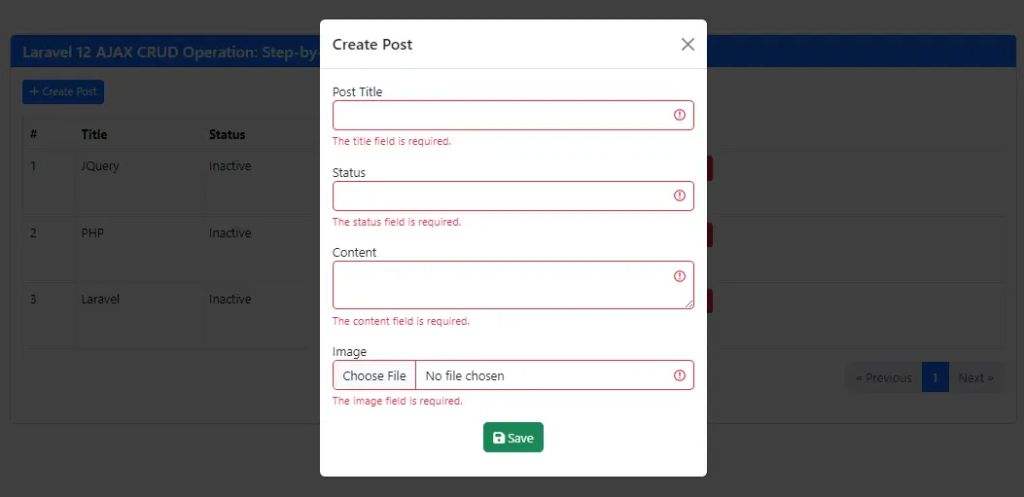
- Bootstrap modal used for Create / Update Post.
- Shows spinner when isFormLoading = true.
- Uses @submit.prevent=”savePost” to prevent page reload and call savePost().
- @change=”handleImage” saves selected file.
- Form Submit Button disabled when submitting (isSubmitting).
- Shows: Processing spinner while saving. Save / Update text depending on mode.
Props (from Parent)
- editPost
- Receives post data from parent component.
- Used to fill form when editing.
Emits (to Parent)
- post-created : refresh list after create.
- post-updated : refresh list after update.
- close : close form.
watch(props.editPost)
- Runs when edit post changes.
- Fills form with selected post data.
- Or resets form if creating new.
Methods
resetForm()
- Clears form fields.
- Clears errors.
- Clears file input.
handleImage(e)
- Gets selected image file.
- Saves it in post.image.
closeForm()
- Calls resetForm() when modal closes.
savePost()
Handles Create + Update API request.
- Start loading (isSubmitting).
- Create FormData.
- Append title, status, content, image.
- If post.id exists : Update API
- Else : Create API
- Emit event to parent.
- Show success toast.
- Handle validation errors (422).
Step 9: Show Post Component
Create resources/js/components/Show.vue:
  <template>
  <!--Create modal -->
     <div class="modal fade" id="show_modal" tabindex="-1" aria-labelledby="exampleModalLabel">
        <div class="modal-dialog">
            <div class="modal-content">
            <div class="modal-header">
                <h1 class="modal-title fs-5" id="exampleModalLabel">
                  <i class="fa-regular fa-eye"></i>  Show Post
                </h1>
                <button type="button" class="btn-close" data-bs-dismiss="modal" aria-label="Close"></button>
            </div>
            <div class="modal-body">
                 <p><strong>Title:</strong> <span class="title">{{post.title}}</span></p>
                 <p><strong>Status:</strong> <span class="status">{{ post.status}}</span></p>
                 <p v-if="post.image"><strong>Image:</strong><img :src=" '/' + post.image" class="img img-thumbnail" width="200"/></p>
                <p><strong>Content:</strong> <span class="content">{{post.content}}</span></p>
            </div>

            </div>
        </div>
    </div>
     <!-- End -->
</template>

<script setup>
defineProps({
  post: Object
})
</script>
Explanation
- Bootstrap modal used to display post details.
- Receives post data from parent component.
- Used to display post details in modal.
Step 10: Update Vue App
Update resources/js/app.js:
import { createApp } from 'vue';

const app = createApp({});

import Posts from './components/Posts.vue';
import Forms from './components/Forms.vue';
import Show from './components/Show.vue';


app.component('post-component', Posts);
app.component('forms', Forms);
app.component('show', Show);


app.mount('#app');
Step 11: Update Welcome Blade
Open resources/views/welcome.blade.php and update with the following code.
<!DOCTYPE html>
<html>
<head>
    <title>Laravel 12 CRUD Vue JS 3 Tutorial – Step-by-Step Guide</title>
     <!-- Styles / Scripts -->
        @if (file_exists(public_path('build/manifest.json')) || file_exists(public_path('hot')))
            @vite(['resources/css/app.css', 'resources/js/app.js'])
        @endif
    <link href="https://cdn.jsdelivr.net/npm/bootstrap@5.3.8/dist/css/bootstrap.min.css" rel="stylesheet">
    <link rel="stylesheet" href="https://cdnjs.cloudflare.com/ajax/libs/font-awesome/6.5.1/css/all.min.css" />
    <meta name="csrf-token" content="{{ csrf_token() }}">
</head>
<body>
    <div class="container mt-5">
        <div class="card">
            <h5 class="card-header bg-primary text-white">Laravel 12 CRUD Vue JS 3 Tutorial – Step-by-Step Guide - ItStuffSolutiotions</h5>

            <div id="app">

                <post-component></post-component>
            </div>
        </div>
    </div>

    <script src="https://cdn.jsdelivr.net/npm/bootstrap@5.3.8/dist/js/bootstrap.bundle.min.js"></script>
     <script src="https://code.jquery.com/jquery-3.6.0.min.js"></script>


</body>

</html>
Step 12: Run the Application
We have completed all the steps successfully Next, Start Laravel server:
php artisan serve
visit the url http://127.0.0.1:8000
You now have a fully working Laravel 12 CRUD application with Vue 3.
Conclusion
In this Laravel tutorial, we built a complete Laravel 12 CRUD Vue JS 3 Application step by step from scratch. Laravel 12 provides a powerful API backend, while Vue 3 delivers a reactive and smooth frontend experience.
Combining Laravel 12 backend with Vue 3 frontend gives you:
- Fast development
- Clean API structure
- Scalable application architecture
- Modern SPA experience
Frequently Asked Questions (FAQs)
Why use Vue.js 3 with Laravel 12?
Vue.js 3 works very well with Laravel because it provides a reactive frontend framework that integrates easily with Laravel APIs. Using Vue 3 allows developers to build dynamic single-page applications (SPAs) while Laravel handles the backend logic and database operations.
What is the Composition API in Vue 3?
The Composition API is a modern way of writing Vue components introduced in Vue 3. It allows developers to organize logic using functions such as ref, reactive, and onMounted, making the code more reusable and easier to maintain compared to the Options API.
Do I need to install Vue Router for this CRUD project?
No, Vue Router is not required for this basic CRUD tutorial. However, if you want to create a more advanced single-page application with multiple pages or routes, installing Vue Router would be beneficial.
Why is Axios used in this tutorial?
Axios is a popular JavaScript library used for making HTTP requests from the frontend to the backend API. In this tutorial, Axios is used to send requests to Laravel API endpoints to create, fetch, update, and delete posts.
Can I use this Laravel 12 Vue 3 CRUD setup for a production project?
Yes, but you should enhance it for production by adding features such as:
Authentication (Laravel Sanctum or Passport)
Form validation and error handling
API resource responses
Pagination
Security measures and rate limiting
Can I use Tailwind CSS or Bootstrap with this project?
Yes. You can easily add Tailwind CSS for CRUD application. Laravel works very well with both styling frameworks.
Is Laravel 12 suitable for building APIs?
Yes. Laravel is widely used for building RESTful APIs because it provides powerful tools such as API resources, authentication, middleware, and validation.
