
In this Laravel tutorial, you’ll learn how to display validation error messages in Blade views with a step-by-step example. We’ll explore two different methods to show error messages effectively in your Laravel application.
When working with forms in Laravel, it’s important to display validation error messages to guide users when they make mistakes. Laravel makes this super easy with its built-in validation system and the $errors variable automatically shared with all views.
Table of Contents
Understanding Laravel’s Validation Error System
Laravel automatically makes validation errors available to all views through the $errors variable, which is an instance of Illuminate\Support\MessageBag. This variable is shared across all views via the Illuminate\View\Middleware\ShareErrorsFromSession middleware, included in Laravel’s default web middleware group, ensuring consistent access to validation errors throughout your application.
In Laravel, you can easily check if your Blade view has any validation errors using different helper methods provided by the $errors variable. Here are some common ways to do it:
- $errors->any() – Returns true if there is at least one validation error.
- $errors->has($key) – Checks if a specific input field (like email or name) has an error messages.
- $errors->count() > 0 – Another way to verify whether any validation errors exist by counting them.
- $errors->isEmpty() – Returns true if there are no errors present.
These methods help you control how and when to display error messages in your Blade templates, giving you flexibility to handle validation feedback more precisely.
Prerequisites
Before starting, make sure you have:
- A working Laravel app.
- Basic knowledge of routes, controllers, and Blade.
Basic Validation Setup
Implement Validation code in controller
Before displaying errors, you need to implement validation in your controller. Here’s a basic example:
<?php

namespace App\Http\Controllers;

use Illuminate\View\View;
use Illuminate\Http\Request;
use Illuminate\Http\RedirectResponse;


class UserController extends Controller
{
     /**
     * Show the application form.
     *
     * @return \Illuminate\Http\Response
     */
    public function create(): View
    {
        return view('form');
    }

     /**
     * Store data.
     *
     * @return \Illuminate\Http\Response
     */
    public function store(Request $request): RedirectResponse
    {

           $request->validate([
              'name' => 'required|string|max:255',
              'contacts' => 'required|array',
              'contacts.phone' => 'required|digits:10',
              'contacts.email' => 'required|email',
              'password' => 'required|min:8|confirmed',
           ]);


        return back()->with('success', 'contact details saved successfully.');
    }
}
When validation fails, Laravel automatically redirects users back to the previous page with validation errors flashed to the session.
Read Also : Laravel 12 Custom Validation Error Messages Example
Blade View to Show Validation error Message
Next, let’s create a Blade view file resources/views/user/form.blade.php to show the form and validation messages.
<!DOCTYPE html>
<html lang="en">
<head>
    <title>Laravel Show Validation Error Message in Blade - ItStuffSolutiotions</title>
    <meta charset="utf-8">
    <meta http-equiv="X-UA-Compatible" content="IE=edge">
    <meta name="viewport" content="width=device-width, initial-scale=1">

    <!-- Bootstrap 5.3.8 CSS -->
    <link href="https://cdn.jsdelivr.net/npm/bootstrap@5.3.8/dist/css/bootstrap.min.css" rel="stylesheet">
</head>
<body>
<div class="container">
    <div class="card mt-5 shadow-lg border-0">
        <h3 class="card-header p-3 bg-primary text-white">
            Laravel Show Validation Error Message in Blade - ItStuffSolutiotions
        </h3>
        <div class="card-body">

            @session('success')
            <div class="alert alert-success alert-dismissible fade show" role="alert">
                    {{ session('success') }}
                    <button type="button" class="btn-close" data-bs-dismiss="alert" aria-label="Close"></button>
                </div>
            @endsession
            <form method="POST" action="{{ route('validate') }}" enctype="multipart/form-data">
                @csrf
                 <div class="mb-3">
                    <label class="form-label">Name:</label>
                   <input type="text" name="name" class="form-control" placeholder="Name">
                </div>
                <div class="mb-3">
                    <label class="form-label">Phone:</label>
                   <input type="text" name="contacts[phone]" class="form-control" placeholder="Phone">
                </div>
                <div class="mb-3">
                   <label class="form-label">Email:</label>
                   <input type="email" name="contacts[email]" class="form-control" placeholder="Email">
                </div>
                <div class="mb-3">
                   <label class="form-label">Password:</label>
                   <input type="password" name="password" class="form-control" placeholder="Password">
                </div>
                 <div class="mb-3">
                    <label class="form-label">Confirm Password:</label>
                     <input type="password"
                                       class="form-control"
                                       id="password_confirmation"
                                       name="password_confirmation"
                                       placeholder="Confirm your password">


                </div>

                <div class="mb-3">
                    <button class="btn btn-success btn-submit">Submit</button>
                </div>
            </form>
        </div>
    </div>
</div>

<!-- Bootstrap 5.3.8 JS (with Popper) -->
<script src="https://cdn.jsdelivr.net/npm/bootstrap@5.3.8/dist/js/bootstrap.bundle.min.js"></script>
</body>
</html>
Create Routes
Now, define routes for displaying and submitting the form. Open your routes/web.php file and add:
<?php

use Illuminate\Support\Facades\Route;
use App\Http\Controllers\UserController;

Route::get('custom-validation', [UserController::class, 'create']);
Route::post('custom-validation', [UserController::class, 'store'])->name('validate');
Method 1: Display All Validation Errors
The most straightforward approach is to display all validation errors at once, add at the top of your form like this:
           @if ($errors->any())
                <div class="alert alert-danger">
                    <ul>
                        @foreach ($errors->all() as $error)
                            <li>{{ $error }}</li>
                        @endforeach
                    </ul>
                </div>
            @endif


            <form method="POST" action="{{ route('validate') }}" enctype="multipart/form-data">
                @csrf
                 <div class="mb-3">
                    <label class="form-label">Name:</label>
                   <input type="text" name="name" class="form-control" placeholder="Name">
                </div>
                <div class="mb-3">
                    <label class="form-label">Phone:</label>
                   <input type="text" name="contacts[phone]" class="form-control" placeholder="Phone">
                </div>
                <div class="mb-3">
                   <label class="form-label">Email:</label>
                   <input type="email" name="contacts[email]" class="form-control" placeholder="Email">
                </div>
                <div class="mb-3">
                   <label class="form-label">Password:</label>
                   <input type="password" name="password" class="form-control" placeholder="Password">
                </div>
                 <div class="mb-3">
                    <label class="form-label">Confirm Password:</label>
                     <input type="password"
                                       class="form-control "
                                       id="password_confirmation"
                                       name="password_confirmation"
                                       placeholder="Confirm your password">

                </div>

                <div class="mb-3">
                    <button class="btn btn-success btn-submit">Submit</button>
                </div>
            </form>
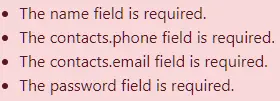
This method uses $errors->any() to check if any validation errors exist. The $errors->all() method returns an array of all error messages.
Method 2: Display Field-Specific Errors using the @error Directive
Laravel 5.8.13 introduced the @error directive, which provides a cleaner and more concise way to display field-specific errors:
 <form method="POST" action="{{ route('validate') }}" enctype="multipart/form-data">
                @csrf
                 <div class="mb-3">
                    <label class="form-label">Name:</label>
                   <input type="text" name="name" class="form-control  @error('name') is-invalid @enderror " placeholder="Name">

                    @error('name')
                        <div class="invalid-feedback">{{ $message }}</div>
                    @enderror
                </div>
                <div class="mb-3">
                    <label class="form-label">Phone:</label>
                   <input type="text" name="contacts[phone]" class="form-control  @error('contacts.phone') is-invalid @enderror " placeholder="Phone">
                   @error('name')
                        <div class="invalid-feedback">{{ $message }}</div>
                    @enderror
                </div>
                <div class="mb-3">
                   <label class="form-label">Email:</label>
                   <input type="email" name="contacts[email]" class="form-control @error('contacts.email') is-invalid @enderror " placeholder="Email">
                   @error('contacts.email')
                        <div class="invalid-feedback">{{ $message }}</div>
                    @enderror
                </div>
                <div class="mb-3">
                   <label class="form-label">Password:</label>
                   <input type="password" name="password" class="form-control @error('password') is-invalid @enderror " placeholder="Password">
                   @error('password')
                        <div class="invalid-feedback">{{ $message }}</div>
                    @enderror
                </div>
                 <div class="mb-3">
                    <label class="form-label">Confirm Password:</label>
                     <input type="password"
                                       class="form-control @error('password_confirmation') is-invalid @enderror"
                                       id="password_confirmation"
                                       name="password_confirmation"
                                       placeholder="Confirm your password">

                    @error('password_confirmation')
                        <div class="invalid-feedback">{{ $message }}</div>
                    @enderror
                </div>

                <div class="mb-3">
                    <button class="btn btn-success btn-submit">Submit</button>
                </div>
            </form>
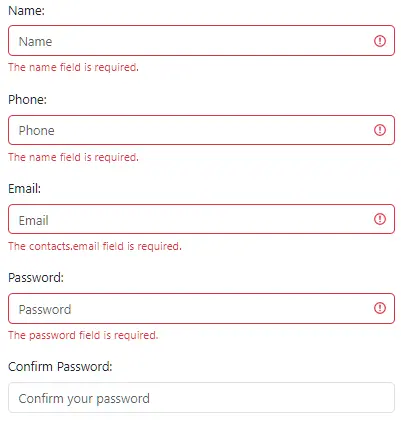
The @error directive automatically checks if validation errors exist for the specified field and makes the error message available through the $message variable.
Error Display with Conditional Styling
You can also use the @error directive with @else for conditional styling:
<input type="email" name="email" id="email" value="{{ old('email') }}"
       class="form-control @error('email') is-invalid @else is-valid @enderror">
This approach applies is-invalid class when there’s an error and is-valid class when there isn’t.
Method 3: Display Field-Specific Errors (Traditional Method)
For better user experience, display errors next to their respective form fields:
  <form method="POST" action="{{ route('validate') }}" enctype="multipart/form-data">
                @csrf
                 <div class="mb-3">
                    <label class="form-label">Name:</label>
                    <input type="text" name="name"
                           class="form-control {{ $errors->has('name') ? 'is-invalid' : '' }}"
                           placeholder="Enter name" >
                    @if($errors->has('name'))
                        <div class="invalid-feedback">
                            {{ $errors->first('name') }}
                        </div>
                    @endif
                </div>
                <div class="mb-3">
                    <label class="form-label">Phone:</label>
                    <input type="text" name="contacts[phone]"
                           class="form-control {{ $errors->has('contacts.phone') ? 'is-invalid' : '' }}"
                           placeholder="Enter phone number">
                    @if($errors->has('contacts.phone'))
                        <div class="invalid-feedback">
                            {{ $errors->first('contacts.phone') }}
                        </div>
                    @endif
                </div>
                 <div class="mb-3">
                    <label class="form-label">Email:</label>
                    <input type="email" name="contacts[email]"
                           class="form-control {{ $errors->has('contacts.email') ? 'is-invalid' : '' }}"
                           placeholder="Enter email" >
                    @if($errors->has('contacts.email'))
                        <div class="invalid-feedback">
                            {{ $errors->first('contacts.email') }}
                        </div>
                    @endif
                </div>
                <div class="mb-3">
                    <label class="form-label">Password:</label>
                    <input type="password" name="password"
                           class="form-control {{ $errors->has('password') ? 'is-invalid' : '' }}"
                           placeholder="Enter password">
                    @if($errors->has('password'))
                        <div class="invalid-feedback">
                            {{ $errors->first('password') }}
                        </div>
                    @endif
                </div>
                <div class="mb-3">
                    <label class="form-label">Confirm Password:</label>
                    <input type="password" name="password_confirmation"
                           class="form-control {{ $errors->has('password_confirmation') ? 'is-invalid' : '' }}"
                           placeholder="Confirm password">
                    @if($errors->has('password_confirmation'))
                        <div class="invalid-feedback">
                            {{ $errors->first('password_confirmation') }}
                        </div>
                    @endif
                </div>

                <div class="mb-3">
                    <button class="btn btn-success btn-submit">Submit</button>
                </div>
            </form>
This approach uses:
- $errors->has(‘field’) to check if a specific field has errors.
- $errors->first(‘field’) to get the first error message for a field.
- Bootstrap’s is-invalid class for styling.
Conclusion
Laravel provides multiple flexible approaches for displaying validation errors in Blade templates. The @error directive offers the cleanest syntax for field-specific errors, while traditional methods provide more control over error display logic. Choose the approach that best fits your application’s needs, and always prioritize user experience by providing clear, actionable feedback when validation fails.
By implementing these techniques, you’ll create robust, user-friendly forms that guide users toward successful form submissions while maintaining clean, maintainable code.
